shadcn.io is an independent project built on shadcn/ui
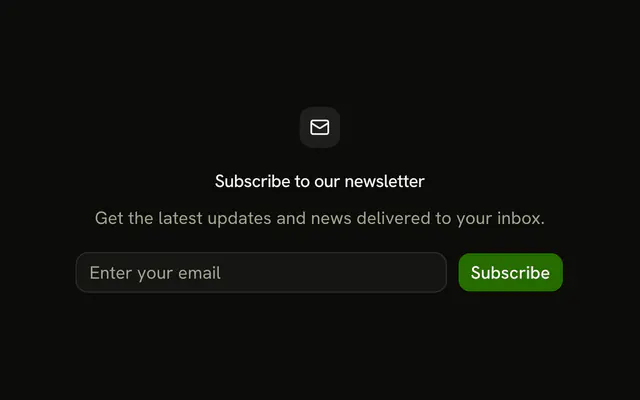
Email and Subscribe sit on one row. The Email label is hidden visually and still names the field. The address must be valid, or the error shows under the field.
Use it in a footer or a banner where a stacked form is too tall. A visible label is a normal Field. In React, Ark UI still ties that hidden label to the field.
Installation
Usage
<form
  className="flex w-full max-w-md items-start gap-2"
  onSubmit={form.handleSubmit(onSubmit)}
>
  <Controller
    control={form.control}
    name="email"
    render={({ field, fieldState }) => (
      <Field className="flex-1" invalid={fieldState.invalid}>
        <FieldLabel className="sr-only">Email</FieldLabel>
        <Input {...field} placeholder="Enter your email" type="email" />
        <FieldError>{fieldState.error?.message}</FieldError>
      </Field>
    )}
  />
  <Button type="submit">Subscribe</Button>
</form>
FAQ
How is the email and button kept on one row?
The form is flex items-start gap-2 inside max-w-md. The email Field has flex-1, and Subscribe is a type="submit" button beside it.
Why is the Email label sr-only?
FieldLabel has className="sr-only", so the input keeps its accessible name, Email, without a visible label. The visible hint is the placeholder Enter your email.
Where does the email error show?
FieldError is inside the Field, under the input. The message is Please enter a valid email address., from z.email().
What value does Subscribe accept?
email must pass z.email(). defaultValues starts it as an empty string, and form.handleSubmit(onSubmit) logs the address only after the check passes.
API Reference
Field
Sets invalid={fieldState.invalid}. The rest is on the Field page.
Input
Sets field, placeholder="Enter your email" and type="email". The rest is on the Input page.
Button
Sets type="submit". The rest is on the Button page.