shadcn.io is an independent project built on shadcn/ui
Six boxes sit in a single group, with no break between them. Letters and digits are kept, and other characters are ignored.
Use one row when the code is printed without groups, such as a license key. A plain Input fits a code that is much longer than six. In React, Ark UI does not verify the code.
Installation
Anatomy
Usage
<InputOTP type="alphanumeric">
  <InputOTPGroup>
    <InputOTPSlot className="bg-background" index={0} />
    <InputOTPSlot className="bg-background" index={1} />
    <InputOTPSlot className="bg-background" index={2} />
    <InputOTPSlot className="bg-background" index={3} />
    <InputOTPSlot className="bg-background" index={4} />
    <InputOTPSlot className="bg-background" index={5} />
  </InputOTPGroup>
</InputOTP>
FAQ
How are letters and digits allowed?
type is alphanumeric. The other values are numeric, the default, and alphabetic.
What happens to other characters?
They're ignored: a space or a symbol typed into a slot doesn't appear, and pasted text that doesn't match isn't entered.
Are letters case-sensitive?
The field keeps the case that was typed. If your codes aren't case-sensitive, convert the value to upper case before you check it.
Why one group of six?
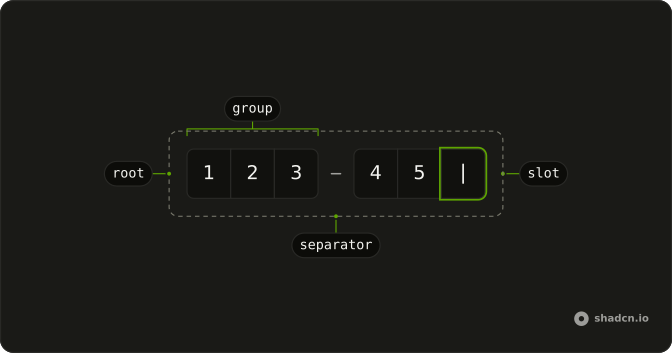
Alphanumeric codes are usually shown without breaks, so the six slots sit in one InputOTPGroup. Add an InputOTPSeparator if your codes are printed in groups.
API Reference
Input OTP
Sets type="alphanumeric", index={0}, index={1}, index={2}, index={3} and index={4}. The rest is on the Input OTP page.