shadcn.io is an independent project built on shadcn/ui
View opens three checkbox rows: Show Toolbar, Show Sidebar and Show Status Bar. Toolbar and Status Bar start checked. Sidebar starts clear. More than one can be on.
Use checkbox rows for panels people show and hide independently. For a choice where only one layout can be on, use a Radio Group. On React, Ark UI does not remember the checks after a refresh.
Installation
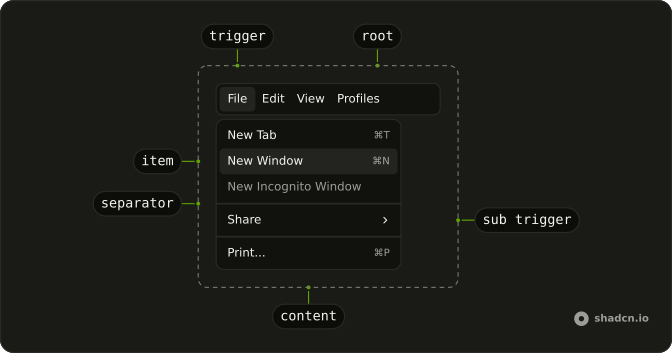
Anatomy
Usage
<Menubar>
  <MenubarMenu>
    <MenubarTrigger>View</MenubarTrigger>
    <MenubarContent>
      <MenubarGroup>
        <MenubarCheckboxItem
          checked={toolbar}
          onCheckedChange={setToolbar}
          value="toolbar"
        >
          Show Toolbar
        </MenubarCheckboxItem>
        <MenubarCheckboxItem
          checked={sidebar}
          onCheckedChange={setSidebar}
          value="sidebar"
        >
          Show Sidebar
        </MenubarCheckboxItem>
        <MenubarCheckboxItem
          checked={statusBar}
          onCheckedChange={setStatusBar}
          value="status-bar"
        >
          Show Status Bar
        </MenubarCheckboxItem>
      </MenubarGroup>
    </MenubarContent>
  </MenubarMenu>
</Menubar>
FAQ
How do these View checkboxes stay checked?
Show Toolbar and Show Status Bar start checked and Show Sidebar starts off. The state lives in the component, so the checks are still there the next time View opens.
Each MenubarCheckboxItem takes checked, onCheckedChange, which receives a boolean, and a value.
Where do the checkboxes sit?
In one MenubarMenu: the MenubarTrigger reads View, and its MenubarContent holds a MenubarGroup with the three rows.
Can more than one of these be on?
Yes. Each row keeps its own state. Use MenubarRadioGroup when only one option may be on.
How do I toggle a row from the keyboard?
Open View with Enter, Space or Arrow Down, move to the row with the arrow keys, and press Enter or Space to toggle it.
API Reference
Menubar
Sets checked={toolbar}, onCheckedChange={setToolbar}, value="toolbar", checked={sidebar}, onCheckedChange={setSidebar} and value="sidebar". The rest is on the Menubar page.