shadcn.io is an independent project built on shadcn/ui
A single trigger, Options, opens Settings, Preferences, a separator and Sign Out. Sign Out is an ordinary row, set off by the line.
Keep a one-menu bar for a small app with only a few commands. If the bar never grows, a Dropdown Menu is the simpler control. Ark UI in React does not sign anyone out.
Installation
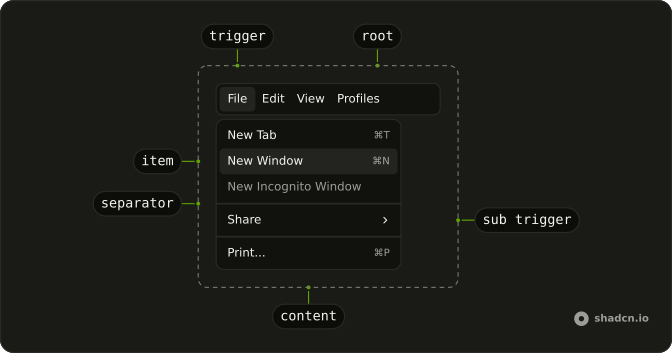
Anatomy
Usage
<Menubar>
  <MenubarMenu>
    <MenubarTrigger>Options</MenubarTrigger>
    <MenubarContent>
      <MenubarItem value="settings">Settings</MenubarItem>
      <MenubarItem value="preferences">Preferences</MenubarItem>
      <MenubarSeparator />
      <MenubarItem value="sign-out">Sign Out</MenubarItem>
    </MenubarContent>
  </MenubarMenu>
</Menubar>
FAQ
What is in this Options menu?
Settings and Preferences, a MenubarSeparator, then Sign Out. All three are plain MenubarItems with text only.
How is Sign Out styled?
Like the other rows; only the separator sets it apart. Add variant="destructive" on its MenubarItem to color it, as in the destructive action menubar.
How do I grow this into File and Edit?
Add another MenubarMenu inside Menubar, with its own MenubarTrigger and MenubarContent. The bar lays the triggers out in a row.
What does the separator do here?
It draws a line between the settings rows and Sign Out, and is announced as a separator. It can't be focused.
Can I open Options from the keyboard?
Yes. Focus the trigger and press Enter, Space or Arrow Down; the arrow keys then move through the rows, and Escape closes the menu.
When is this a dropdown instead?
When the menu won't grow into a bar of several menus. A Dropdown Menu on a button is lighter for a single list of actions.
API Reference
Menubar
Sets value="settings", value="preferences" and value="sign-out". The rest is on the Menubar page.