shadcn.io is an independent project built on shadcn/ui
A bell button carries a badge of 3. It opens Notifications, a Mark all as read button, and three rows: New comment, New follower, and Update available, with their times. Mark all as read does not clear the list.
Use it to show recent activity without leaving the page. Wire Mark all as read yourself if the badge should drop. A full history belongs in a Dialog. In React, Ark UI does not mark the items read.
Installation
Anatomy
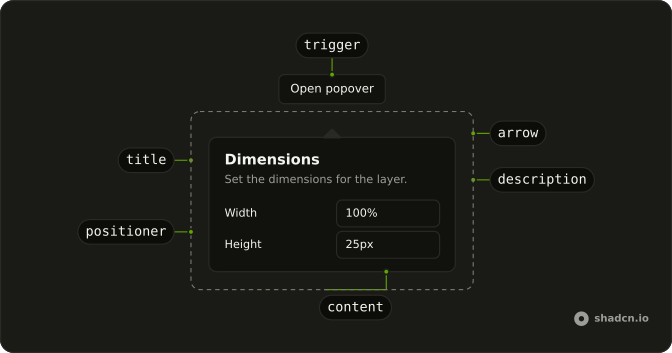
Usage
<Popover>
  <PopoverTrigger asChild>
    <Button
      aria-label={`Notifications, ${notifications.length} unread`}
      size="icon-md"
      variant="ghost"
    >
      <BellIcon aria-hidden="true" className="size-5" />
      <Badge className="absolute -end-1 -top-1" pill size="sm">
        {notifications.length}
      </Badge>
    </Button>
  </PopoverTrigger>
  <PopoverContent className="w-80 max-w-full gap-3">
    <div className="flex items-center justify-between gap-2">
      <PopoverTitle>Notifications</PopoverTitle>
      <Button size="sm" variant="ghost">
        Mark all as read
      </Button>
    </div>
    <Separator />
    <ul className="flex flex-col gap-2">
      {notifications.map((notification) => (
        <li key={notification.title}>
          <p className="font-medium">{notification.title}</p>
          <p className="text-muted-foreground text-xs">{notification.time}</p>
        </li>
      ))}
    </ul>
  </PopoverContent>
</Popover>
FAQ
What does each notification row show?
notifications has three entries. Each li has a font-medium title and a text-muted-foreground text-xs time: New comment, New follower, and Update available. The list is a ul with flex flex-col gap-2.
How does the unread badge get its number?
The Badge renders notifications.length, which is 3. It uses pill, size="sm", and className="absolute -end-1 -top-1". The button aria-label is Notifications, then that count, then unread.
How does the bell become the trigger?
The trigger is a Button with variant="ghost" and size="icon-md". BellIcon has aria-hidden="true" and className="size-5". The badge is the other child of that button. Activating the button opens the panel.
Set asChild on PopoverTrigger and pass that one button. PopoverContent is the panel.
What is in the panel header?
A justify-between row holds PopoverTitle reading Notifications and a ghost Button with size="sm" reading Mark all as read. A Separator sits under that row. PopoverContent is w-80 max-w-full with gap-3. This demo gives the mark-read button no handler yet.
API Reference
Popover
Sets asChild. The rest is on the Popover page.
Button
Sets aria-label, Notifications, notifications, length, unread and size="icon-md". The rest is on the Button page.
Badge
Sets pill and size="sm". The rest is on the Badge page.
Separator
No extra props in this demo. The rest is on the Separator page.