shadcn.io is an independent project built on shadcn/ui
A ghost button reads @username. It opens John Doe, the handle @username, and the line Software Developer.
Use it to show who someone is without leaving the page. For a preview that opens on hover, use a Hover Card. In React, Ark UI does not look up the person.
Installation
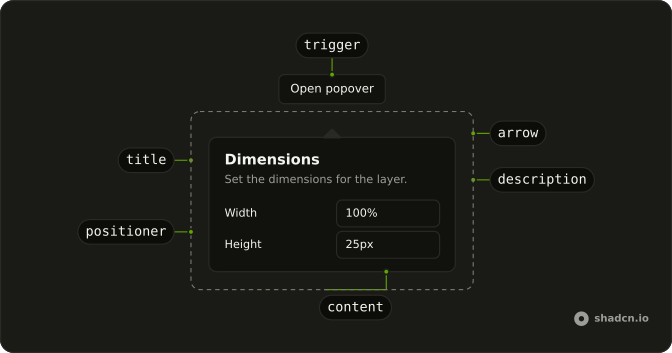
Anatomy
Usage
<Popover>
  <PopoverTrigger asChild>
    <Button variant="ghost">@username</Button>
  </PopoverTrigger>
  <PopoverContent>
    <PopoverHeader>
      <PopoverTitle>John Doe</PopoverTitle>
      <PopoverDescription>@username</PopoverDescription>
    </PopoverHeader>
    <p className="text-xs">Software Developer</p>
  </PopoverContent>
</Popover>
FAQ
What does the profile panel show?
PopoverHeader holds PopoverTitle reading John Doe and PopoverDescription reading @username. Under that, a p with text-xs says Software Developer. The trigger label is @username.
How does the username button open the panel?
The trigger is a Button with variant="ghost" and the label @username. Pressing it, or using Enter or Space, opens the panel. For a preview that opens when the pointer rests on a name, use a Hover Card.
Set asChild on PopoverTrigger and pass that one button. PopoverContent is the panel.
Which text styles separate the name, handle, and role?
The name is PopoverTitle. The handle is PopoverDescription, inside PopoverHeader. The role is a separate p with className="text-xs".
How wide is the profile panel?
PopoverContent has no width class, so it keeps w-72. The content is the header plus the one-line role.
API Reference
Popover
Sets asChild. The rest is on the Popover page.
Button
Sets variant="ghost". The rest is on the Button page.