shadcn.io is an independent project built on shadcn/ui
Open shows a title that reads Title and the line Content goes here. Cancel and Confirm sit at the end of the panel. Both close it.
Use it for a quick confirm tied to one control. A decision that cannot be undone belongs in an Alert Dialog. In React, Ark UI does not perform the confirm.
Installation
Sign in to get your install command
Free with an account. It carries your token, so the CLI installs everything in one go.
Use email insteadNo credit card
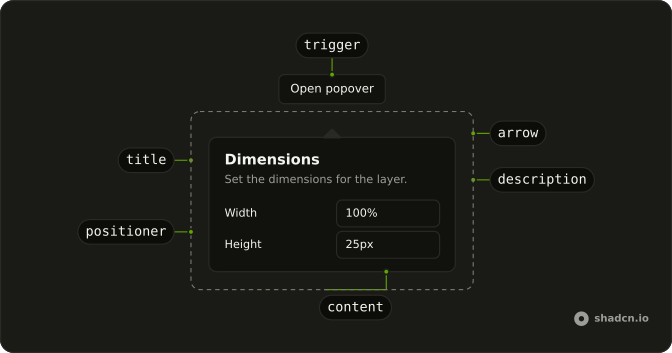
Anatomy
Usage
<Popover>
  <PopoverTrigger asChild>
    <Button variant="outline">Open</Button>
  </PopoverTrigger>
  <PopoverContent>
    <PopoverHeader>
      <PopoverTitle>Title</PopoverTitle>
      <PopoverDescription>Content goes here.</PopoverDescription>
    </PopoverHeader>
    <div className="flex justify-end gap-2">
      <PopoverClose asChild>
        <Button size="sm" variant="outline">
          Cancel
        </Button>
      </PopoverClose>
      <PopoverClose asChild>
        <Button size="sm">Confirm</Button>
      </PopoverClose>
    </div>
  </PopoverContent>
</Popover>
FAQ
API Reference
Popover
Sets asChild. The rest is on the Popover page.
Button
Sets variant="outline" and size="sm". The rest is on the Button page.