shadcn.io is an independent project built on shadcn/ui
Option 1, Option 2 and Option 3 stack in a column, each with a radio and a label. Option 1 starts selected.
Use a vertical group for a single choice in a form or on a settings page. For any number of choices, use a Checkbox. On React, Ark UI does not submit the choice.
Installation
Anatomy
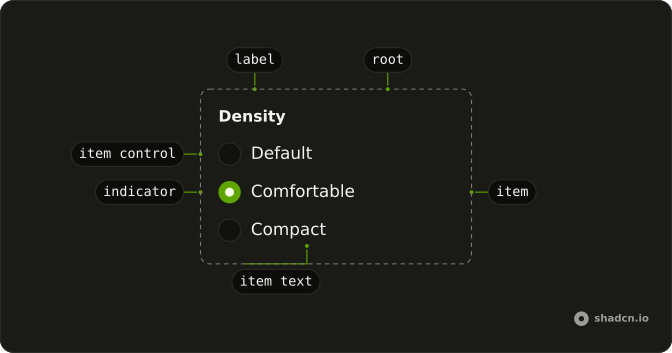
Usage
<RadioGroup className="w-fit" defaultValue="option-1">
  <RadioGroupItem value="option-1">Option 1</RadioGroupItem>
  <RadioGroupItem value="option-2">Option 2</RadioGroupItem>
  <RadioGroupItem value="option-3">Option 3</RadioGroupItem>
</RadioGroup>
FAQ
How does Option 1 start selected?
RadioGroup sets defaultValue to option-1, which matches the first item's value. Leave defaultValue off when nothing should start checked.
How do I control the selected value?
This demo uses defaultValue, so the group stores the choice. Pass value, and onValueChange receives details.value.
Why does clicking Option 2 check the radio?
The text is the item's label, so clicking it checks that item. The text is the child of RadioGroupItem, which renders it as the item's label.
How do I change the space between options?
RadioGroup lays the options out in a grid with a gap from the style. Pass a gap-* class on RadioGroup when you want more or less space.
API Reference
Radio Group
Sets defaultValue="option-1", value="option-1", value="option-2" and value="option-3". The rest is on the Radio Group page.