shadcn.io is an independent project built on shadcn/ui
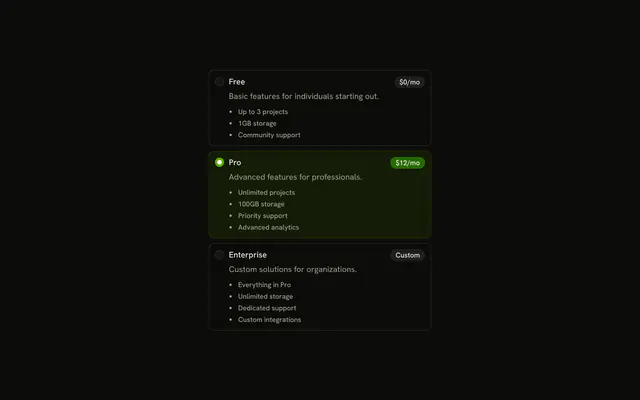
Three radios: Default, Comfortable and Compact. Comfortable starts selected. Each has a muted line under the label about spacing.
Add the line when people need to see what a choice does before they pick it. A Select hides those lines until it opens. In React, Ark UI does not write the descriptions.
Installation
Anatomy
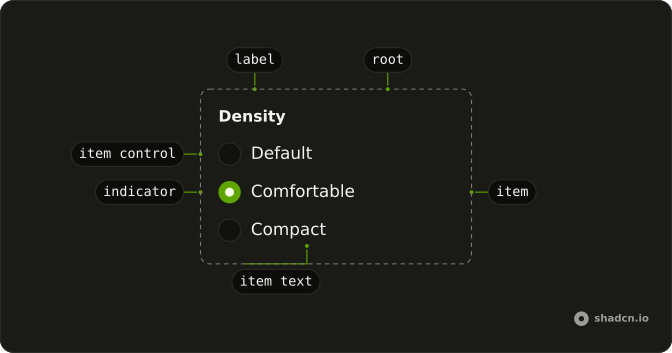
Usage
<RadioGroup className="w-fit" defaultValue="comfortable">
  {options.map((option) => (
    <Field className="gap-1" key={option.value}>
      <RadioGroupItem value={option.value}>{option.label}</RadioGroupItem>
      <FieldDescription className="ps-6">
        {option.description}
      </FieldDescription>
    </Field>
  ))}
</RadioGroup>
FAQ
Which option starts selected?
defaultValue is comfortable, the second option. The item values are default, comfortable, and compact, from a list at the top of the file.
How does the description line up under the label?
Field with the item and a FieldDescription. The description has ps-6, the width of the radio and its gap, so it starts under the text.How is the description styled?
FieldDescription sets text-muted-foreground and text-sm. It is not wired to the item with aria-describedby, so a screen reader reads it as nearby text.
Does clicking the description select the option?
No. Only the name is the label, so clicking the name checks the item and the sentence under it does nothing. The text is the child of RadioGroupItem, which renders it as the item's label.
API Reference
Radio Group
Sets defaultValue="comfortable" and value={option.value}. The rest is on the Radio Group page.
Field
No extra props in this demo. The rest is on the Field page.