shadcn.io is an independent project built on shadcn/ui
Type a name that is not already a tag and a Create row appears under the matches, with a plus icon and the typed text. Picking it adds the tag and selects it.
Use it for tags and labels people invent as they go. A fixed set, with no create, is a Select. In React, Base UI does not invent the new tag. This row does.
Installation
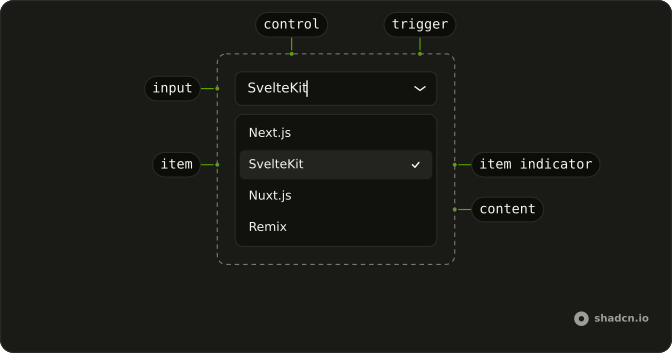
Anatomy
Usage
<Combobox
  items={items}
  onInputValueChange={setSearch}
  onValueChange={handleValueChange}
  value={value}
>
  <ComboboxTrigger
    render={
      <Button className="w-[250px] justify-between" variant="outline" />
    }
  >
    <ComboboxValue placeholder="Select or create tag..." />
  </ComboboxTrigger>
  <ComboboxContent>
    <ComboboxInput placeholder="Search or create..." showTrigger={false} />
    <ComboboxList>
      {(tag: Tag, index: number) =>
        tag.value === CREATE ? (
          <Fragment key={tag.value}>
            {index > 0 ? <ComboboxSeparator /> : null}
            <ComboboxItem className="gap-2" value={tag}>
              <PlusIcon aria-hidden="true" className="size-4" />
              {tag.label}
            </ComboboxItem>
          </Fragment>
        ) : (
          <ComboboxItem key={tag.value} value={tag}>
            {tag.label}
          </ComboboxItem>
        )
      }
{/* The rest of the file is under Installation. */}
FAQ
When does the Create row show?
When the trimmed search isn't empty and isn't already one of the tags. The demo keeps the search text in state to work that out.
How is the Create row built?
As one more option with a special value, after a ComboboxSeparator, showing a PlusIcon and Create followed by the text in quotes. Being an option, it's reached with the arrow keys and picked with Enter.
What happens when it's picked?
The change handler sees the special value, adds the text to the tags and selects the new tag instead.
API Reference
Combobox
Sets items={items}, onInputValueChange={setSearch}, onValueChange={handleValueChange}, value={value}, placeholder="Select or create tag..." and placeholder="Search or create...". The rest is on the Combobox page.
Button
Sets variant="outline". The rest is on the Button page.