shadcn.io is an independent project built on shadcn/ui
The trigger is a secondary badge labeled Verified, with a shield. The card repeats the shield, titles it Verified Account, and says the account meets the security standards.
Save it for a status whose meaning is not obvious from the word. A Tooltip fits if that explanation shrinks to one line. In React, Base UI opens this card after a short pause.
Installation
Anatomy
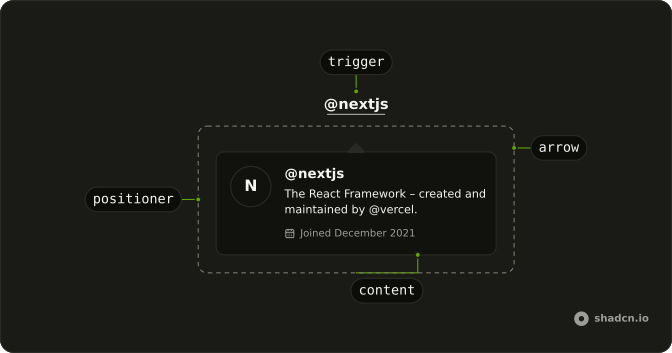
Usage
<HoverCard>
  <HoverCardTrigger
    closeDelay={100}
    delay={10}
    render={<button className="rounded-full" type="button" />}
  >
    <Badge variant="secondary">
      <ShieldIcon aria-hidden="true" data-icon="inline-start" />
      Verified
    </Badge>
  </HoverCardTrigger>
  <HoverCardContent className="max-w-full">
    <div className="flex gap-3">
      <div className="flex size-10 shrink-0 items-center justify-center rounded-full bg-success/10">
        <ShieldIcon aria-hidden="true" className="size-5 text-success" />
      </div>
      <div className="flex flex-col gap-1">
        <h4 className="font-semibold text-sm">Verified Account</h4>
        <p className="text-muted-foreground text-sm">
          This account has been verified by our team and meets our security
          standards.
        </p>
      </div>
    </div>
  </HoverCardContent>
</HoverCard>
FAQ
What is in the card?
A shield on a round tinted tile, bg-success/10 behind a text-success icon, beside the title Verified Account and a muted sentence. The tile has shrink-0, so long text wraps instead of squeezing it.
How is the badge made the trigger?
HoverCardTrigger takes the badge through render, a button with its classes.
Why wrap the Badge in a button?
A Badge is a plain span and can't take focus. The button around it, with rounded-full to follow its shape, gives keyboard users a way to open the card.
How wide is the card?
The default hover card width. Set a width class such as w-80 on the card to fit longer content.
How do I change how fast the card opens and closes?
The card opens a moment after the pointer rests on the trigger and stays up long enough for the pointer to move into it. Both delays are in milliseconds.
The demo sets delay 10 and closeDelay 100 on HoverCardTrigger. side and align on HoverCardContent place it.
Does the card open from the keyboard and on touch screens?
Focusing the badge opens the card, moving focus away or pressing Escape closes it. Touch screens have no hover, so keep what matters reachable elsewhere, or use a Popover when the card has to open on a tap.
API Reference
Hover Card
No extra props in this demo. The rest is on the Hover Card page.
Badge
Sets variant="secondary". The rest is on the Badge page.