shadcn.io is an independent project built on shadcn/ui
The label API Endpoint sits next to a code icon. The card is titled Endpoint Details and shows Method GET, URL /api/v1/users, and Auth Bearer Token Required.
Put it on an API screen when those three fields are useful but not always needed. A Tooltip is too small for three fields. In React, Base UI does not call the endpoint.
Installation
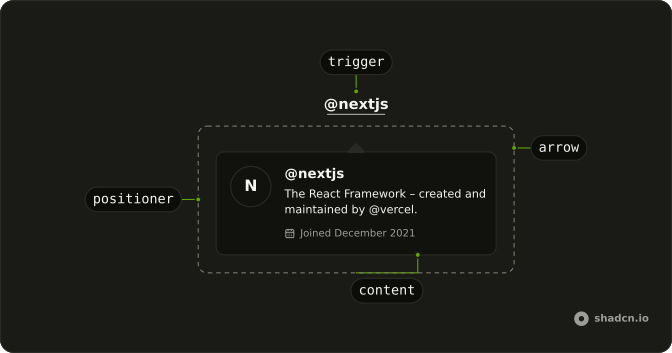
Anatomy
Usage
<div className="flex items-center gap-2">
  <span className="text-sm">API Endpoint</span>
  <HoverCard>
    <HoverCardTrigger
      aria-label="Endpoint details"
      closeDelay={100}
      delay={10}
      render={<button className="text-muted-foreground" type="button" />}
    >
      <CodeIcon aria-hidden="true" className="size-4" />
    </HoverCardTrigger>
    <HoverCardContent className="w-80 max-w-full">
      <div className="flex flex-col gap-3">
        <h4 className="font-semibold text-sm">Endpoint Details</h4>
        <div className="flex flex-col gap-2 text-sm">
          <div>
            <span className="text-muted-foreground">Method:</span>{" "}
            <code className="rounded bg-muted px-1.5 py-0.5 text-xs">
              GET
            </code>
          </div>
          <div>
            <span className="text-muted-foreground">URL:</span>{" "}
            <code className="rounded bg-muted px-1.5 py-0.5 text-xs">
              /api/v1/users
            </code>
          </div>
          <div>
            <span className="text-muted-foreground">Auth:</span>{" "}
            <span className="text-xs">Bearer Token Required</span>
          </div>
{/* The rest of the file is under Installation. */}
FAQ
What is in the card?
The title Endpoint Details and three lines: Method GET and URL /api/v1/users in small code chips on bg-muted, and Auth: Bearer Token Required.
How is the code icon made the trigger?
HoverCardTrigger takes the code icon through render, a button with its classes.
How is the icon button named?
The CodeIcon is hidden from assistive tech, so the button carries aria-label="Endpoint details".
How wide is the card?
w-80 on the card, for the extra content.
The class is on HoverCardContent.
max-w-full keeps it inside narrow screens.
How do I change how fast the card opens and closes?
The card opens a moment after the pointer rests on the trigger and stays up long enough for the pointer to move into it. Both delays are in milliseconds.
The demo sets delay 10 and closeDelay 100 on HoverCardTrigger. side and align on HoverCardContent place it.
Does the card open from the keyboard and on touch screens?
Focusing the icon button opens the card, moving focus away or pressing Escape closes it. The icon button carries an aria-label, so it is announced by name. Touch screens have no hover, so keep what matters reachable elsewhere, or use a Popover when the card has to open on a tap.
API Reference
Hover Card
No extra props in this demo. The rest is on the Hover Card page.