shadcn.io is an independent project built on shadcn/ui
Tasks completed sits at the start of the row and 7 of 10 at the end. The bar under it is filled to 7 of 10.
Count finished items when a percentage would hide the real numbers. Steps fit better when each item is a named stage. In React, Base UI does not move the bar on its own.
Installation
Sign in to get your install command
Free with an account. It carries your token, so the CLI installs everything in one go.
Use email insteadNo credit card
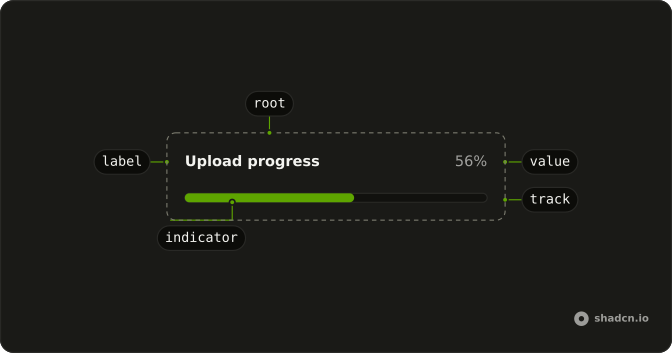
Anatomy
Usage
<Progress className="w-full max-w-md gap-2" max={TOTAL} value={COMPLETED}>
  <ProgressLabel className="font-normal text-muted-foreground">
    Tasks completed
  </ProgressLabel>
  <ProgressValue className="font-medium text-foreground">
    {(_formattedValue, value) => `${value} of ${TOTAL}`}
  </ProgressValue>
</Progress>
FAQ
Where do 7 and 10 come from?
Two constants, COMPLETED and TOTAL, at the top of the file. Change them, or pass your own numbers, to move the bar and the text together.
How does the bar show 7 of 10?
Progress gets max 10 and value 7, and ProgressValue is a function that returns the value, of, and TOTAL.
Does a screen reader hear 7 of 10?
It hears the value as a percent. Pass getAriaValueText to read 7 of 10 instead.
API Reference
Progress
Sets max={TOTAL} and value={COMPLETED}. The rest is on the Progress page.