shadcn.io is an independent project built on shadcn/ui
A Features header on a bordered card, and a chevron that turns when it opens. The list under the divider reads Fully accessible, Keyboard navigation, and Smooth animations.
Use it for a short feature list that can stay closed. If several cards should open one at a time, use an Accordion. In Solid, Ark UI does not share open state between them.
Installation
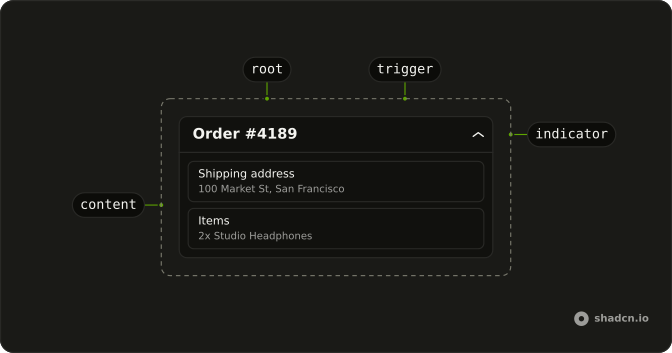
Anatomy
Usage
<Collapsible class="w-full max-w-lg rounded-lg border bg-card text-card-foreground shadow-sm">
    <CollapsibleTrigger class="group flex w-full items-center justify-between p-4 font-medium">
      Features
      <ChevronDownIcon aria-hidden="true" class="size-4 transition-transform duration-200 group-aria-expanded:rotate-180" />
    </CollapsibleTrigger>
    <CollapsibleContent class="border-t px-4 py-3">
      <ul class="flex list-disc flex-col gap-2 ps-4 text-muted-foreground text-sm">
        <li>Fully accessible</li>
        <li>Keyboard navigation</li>
        <li>Smooth animations</li>
      </ul>
    </CollapsibleContent>
  </Collapsible>
FAQ
Which classes make this a card?
Collapsible carries rounded-lg border bg-card text-card-foreground shadow-sm. The trigger is the full-width Features row with p-4, and CollapsibleContent adds border-t px-4 py-3 so the list sits under a divider.
Does the chevron turn when Features opens?
Yes. The trigger has the group class and sets aria-expanded while open, so group-aria-expanded:rotate-180 on ChevronDownIcon turns it, eased by transition-transform duration-200.
How do I change the height animation?
CollapsibleContent animates its height as it opens and closes, and skips the animation for people who ask for reduced motion. Set disableAnimation on it to open and close at once.
How do I open the card from the keyboard?
Tab reaches the trigger, a button named Features, and Space or Enter toggles the list.
What if I stack several cards like this?
Each Collapsible opens on its own. When several sit in one list and only one should be open at a time, with arrow keys between the headers, use an Accordion.
API Reference
Collapsible
No extra props in this demo. The rest is on the Collapsible page.