shadcn.io is an independent project built on shadcn/ui
The button shows a calendar icon and today's date at 12:00. The popover has a month calendar and, under a divider, a field labeled Time.
Use one picker when a date and a time belong together, such as a deadline. A separate Input for the time is clearer if the calendar should close first. On Solid, Ark UI does not store the time on the date.
Installation
Anatomy
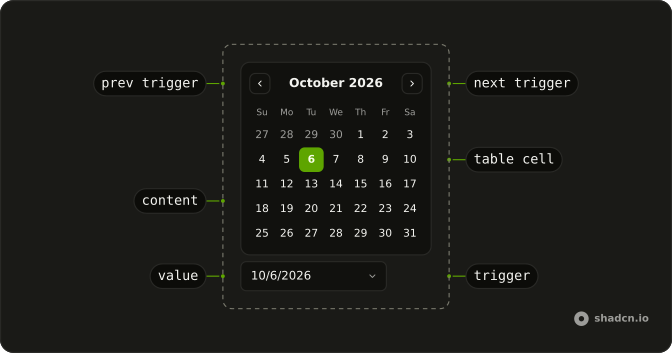
Usage
<DatePicker closeOnSelect={false} onValueChange={handleValueChange} positioning={positioning} value={value()}>
      <DatePickerTrigger asChild={props => <Button {...props({
      "class": "w-70 justify-start font-normal"
    })} variant="outline">
          <CalendarIcon aria-hidden="true" data-icon="inline-start" />
          <span>
            {date ? `${formatDate(date)} at ${time()}` : "Pick a date and time"}
          </span>
        </Button>} />
      <DatePickerContent class="flex flex-col divide-y p-0">
        <div class="p-3">
          <CalendarViewControl>
            <CalendarPrevTrigger />
            <CalendarViewDate />
            <CalendarNextTrigger />
          </CalendarViewControl>
          <CalendarTable>
            <CalendarWeekDays />
            <CalendarTableDays />
          </CalendarTable>
        </div>
        <Field class="p-4">
          <FieldLabel>Time</FieldLabel>
          <Input onInput={handleTimeChange} type="time" value={time()} />
        </Field>
      </DatePickerContent>
    </DatePicker>
FAQ
Why doesn't the picker close when I pick a day?
closeOnSelect is false on DatePicker, so the time field stays reachable. Escape, a click outside or the button close it.
How does the time field work?
It's an Input with type="time", starting at 12:00 and updating its own value on change. The browser draws the hours and minutes and formats them in the user's locale.
Is the time stored with the date?
No: the date is the picker's value and the time is a string such as 14:30. Combine them when you submit, for example into an ISO date-time.
What does the button say?
The date in long form followed by at and the time, or Pick a date and time when no date is selected. The button prints the value itself, formatted with Intl.DateTimeFormat, so the text needs no date library.
API Reference
Date Picker
Sets closeOnSelect={false}, onValueChange={handleValueChange}, positioning={positioning}, value={value()}, asChild and props. The rest is on the Date Picker page.
Button
Sets props, w-70, justify-start, font-normal and variant="outline". The rest is on the Button page.
Calendar
No extra props in this demo. The rest is on the Calendar page.
Field
No extra props in this demo. The rest is on the Field page.
Input
Sets onInput={handleTimeChange}, type="time" and value={time()}. The rest is on the Input page.