shadcn.io is an independent project built on shadcn/ui
Open Dialog shows Share this link. A read-only field holds https://example.com/share/abc123, with Copy beside it. Close sits under the field.
Use it to hand someone a link without leaving the page. Copy does not write to the clipboard until you add that. A share tied to one button can be a Popover. In Solid, Ark UI does not copy the link.
Installation
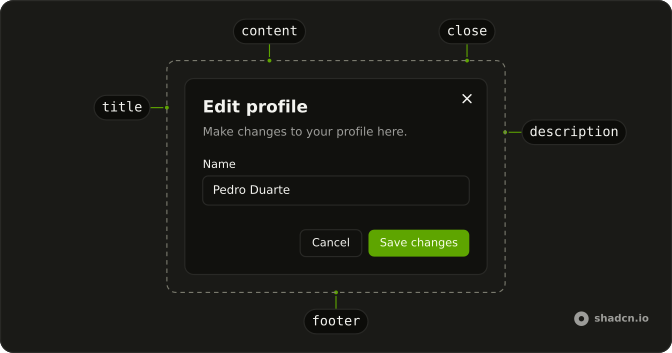
Anatomy
Usage
<Dialog>
    <DialogTrigger asChild={props => <Button {...props()} variant="outline">Open Dialog</Button>} />
    <DialogContent class="sm:max-w-md">
      <DialogHeader>
        <DialogTitle>Share this link</DialogTitle>
        <DialogDescription>
          Anyone who has this link will be able to view this document.
        </DialogDescription>
      </DialogHeader>
      <div class="flex items-center gap-2">
        <Input aria-label="Link" class="flex-1" readOnly type="text" value={shareLink} />
        <Button size="sm">Copy</Button>
      </div>
      <DialogFooter class="sm:justify-start">
        <DialogClose asChild={props => <Button {...props()} variant="secondary">Close</Button>} />
      </DialogFooter>
    </DialogContent>
  </Dialog>
FAQ
How can people close it?
With Close, which is a DialogClose, the X in the corner, Escape, or a click outside.
How does focus work?
Focus moves into the dialog when it opens, stays inside while it's open, and returns to the trigger when it closes.
Can I stop a click outside from closing it?
Yes, for forms with unsaved changes. Set closeOnInteractOutside to false on Dialog. Keep Escape and the close button working.
How do I make Copy work?
Copy the link to the clipboard on click and confirm it. The Clipboard component does this with a built-in indicator.
Can a dialog open another dialog?
It can, but avoid it: a second modal on top is confusing. Change the dialog's content instead, or use a Sheet.
API Reference
Dialog
Sets asChild and props. The rest is on the Dialog page.
Button
Sets props, variant="outline", size="sm" and variant="secondary". The rest is on the Button page.
Input
Sets aria-label="Link", readOnly, type="text" and value={shareLink}. The rest is on the Input page.