shadcn.io is an independent project built on shadcn/ui
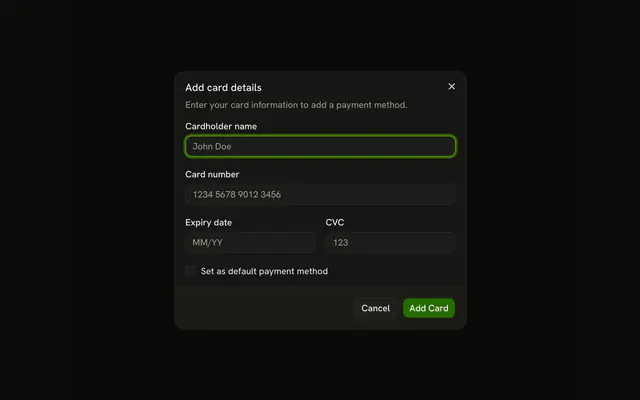
Checkout opens Complete your purchase. Monthly is $29/mo and starts selected. Yearly is $290/yr with a Save 17% badge. The button reads Complete Purchase - $29 until Yearly is picked. Card fields and a default-method checkbox sit under the cards.
Use it when the cycle and the card are chosen together. If the charge cannot be undone, confirm in an Alert Dialog. In Solid, Ark UI does not charge the card.
Installation
Anatomy
Usage
<Dialog>
      <DialogTrigger asChild={props => <Button {...props()} variant="outline">Checkout</Button>} />
      <DialogContent class="sm:max-w-md">
        <DialogHeader>
          <DialogTitle>Complete your purchase</DialogTitle>
          <DialogDescription>
            Choose your billing cycle and enter payment details.
          </DialogDescription>
        </DialogHeader>
        <FieldGroup>
          <FieldSet>
            <FieldLegend variant="label">Billing cycle</FieldLegend>
            <RadioGroup class="grid-cols-2" onValueChange={handleValueChange} value={billingCycle()}>
              {cycles.map(cycle => <FieldLabel>
                  <Field orientation="horizontal">
                    <FieldContent>
                      <FieldTitle>{cycle.label}</FieldTitle>
                      <FieldDescription>{cycle.price}</FieldDescription>
                      {cycle.saving ? <Badge class="w-fit" variant="success">
                          {cycle.saving}
                        </Badge> : null}
                    </FieldContent>
                    <RadioGroupItem value={cycle.value} />
                  </Field>
                </FieldLabel>)}
            </RadioGroup>
          </FieldSet>
          <Field>
            <FieldLabel>Cardholder name</FieldLabel>
            <Input autocomplete="cc-name" name="card-name" placeholder="John Doe" type="text" />
          </Field>
{/* The rest of the file is under Installation. */}
FAQ
How does the price follow the billing cycle?
The radio group is controlled, and the button reads the total for the selected cycle from a static list. Monthly shows $29, Yearly $290.
Why radio cards instead of buttons?
A billing cycle is one choice out of several, which is what a radio group is: arrow keys move between the options and screen readers announce the selection. Each card is a FieldLabel around a Field with the title, the price and the RadioGroupItem.
How is the yearly saving shown?
With a Badge using variant="success" inside the Yearly card, so it follows the theme's success color.
When should I validate the card fields?
When each field loses focus, with the error in a FieldError, and keep Complete Purchase disabled until everything is valid. Better still, use your payment provider's hosted fields.
API Reference
Dialog
Sets asChild and props. The rest is on the Dialog page.
Button
Sets props and variant="outline". The rest is on the Button page.
Field
Sets variant="label" and orientation="horizontal". The rest is on the Field page.
Radio Group
Sets onValueChange={handleValueChange}, value={billingCycle()} and value={cycle.value}. The rest is on the Radio Group page.
Badge
Sets variant="success". The rest is on the Badge page.
Input
Sets autocomplete="cc-name", name="card-name", placeholder="John Doe", type="text", autocomplete="cc-number" and inputMode="numeric". The rest is on the Input page.
Checkbox
Sets name="default-method". The rest is on the Checkbox page.