shadcn.io is an independent project built on shadcn/ui
A bar at 50 percent. The fill is the warning color, and the track is a lighter tint of it. No label is shown.
Use the warning color when the task needs attention but has not failed. Say why in text nearby, or in an Alert, if the color would not be enough. In Solid, Ark UI shows only the value you pass.
Installation
Anatomy
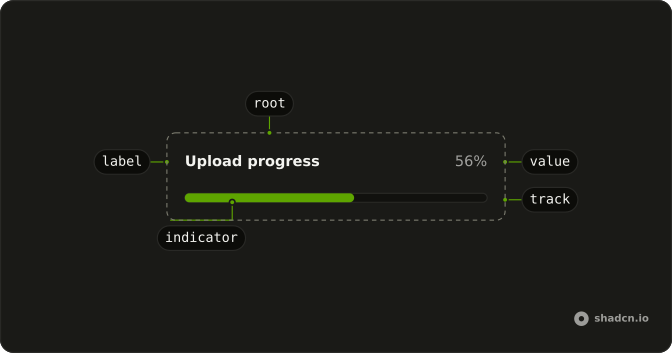
Usage
<Progress aria-label="Upload progress" class="w-full max-w-md **:data-[slot=progress-indicator]:bg-warning *:data-[slot=progress-track]:bg-warning/20" value={50} />FAQ
How is the bar colored?
With classes on Progress, since it has no color prop. **:data-[slot=progress-indicator]:bg-warning colors the fill, which sits inside the track.
*:data-[slot=progress-track]:bg-warning/20 tints the track.
How do I use another color?
Swap warning for another theme color in both classes. The other colored examples use destructive, success and info the same way.
Does 50 pick the color?
No. value only sets the amount; the color classes apply at any value. Change them yourself when the state changes, such as when an upload fails.
What is the accessible name?
Ark UI puts the progressbar role on the track and names it with the value text, here 50%. The aria-label, Upload progress, sits on the root element, so put what the bar measures in visible text nearby when it matters.
API Reference
Progress
Sets aria-label="Upload progress" and value={50}. The rest is on the Progress page.