shadcn.io is an independent project built on shadcn/ui
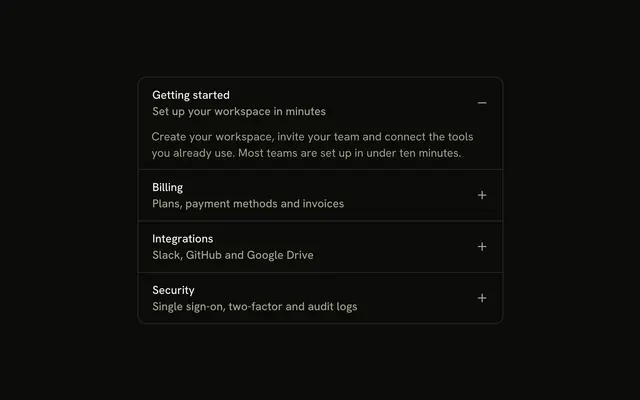
Getting started, Billing, Integrations, and Security. Each trigger stacks a title over a muted subtitle, and the chevron stays on the right. Getting started starts open.
Use it for help topics that need a one-line summary. A single topic can be a Collapsible. In Solid, Ark UI does not write that summary.
Installation
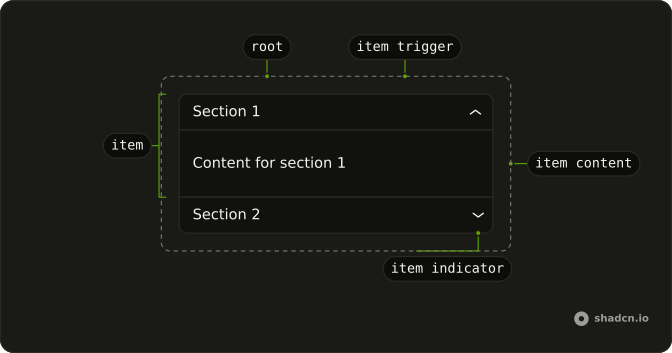
Anatomy
Usage
<Accordion class="w-full max-w-md -space-y-px" defaultValue={["getting-started"]}>
    {items.map(item => <AccordionItem class="overflow-hidden border bg-background px-4 first:rounded-t-lg last:rounded-b-lg" value={item.value}>
        <AccordionTrigger class="hover:no-underline">
          <span class="flex flex-col items-start text-start">
            <span>{item.title}</span>
            <span class="text-muted-foreground text-sm">
              {item.subtitle}
            </span>
          </span>
        </AccordionTrigger>
        <AccordionContent>
          <p class="text-muted-foreground">{item.content}</p>
        </AccordionContent>
      </AccordionItem>)}
  </Accordion>
FAQ
How is the subtitle marked up?
Each item stores a subtitle string under its title. The trigger puts them in a flex flex-col items-start text-start stack, and the subtitle is text-sm text-muted-foreground.
Why does the trigger set hover:no-underline?
hover:no-underline is on AccordionTrigger, so hovering the two-line heading does not underline it. The built-in chevron stays, because this trigger leaves accordion-trigger-icon visible.
Why does Getting started start open?
defaultValue={["getting-started"]} opens Getting started on first render. The string matches that item's value.
How do I let several items stay open at once?
One open item is the default. Add multiple to Accordion to let several stay open, and list every item that should start open in the defaultValue array.
API Reference
Accordion
Sets defaultValue={["getting-started"]} and value={item.value}. The rest is on the Accordion page.