shadcn.io is an independent project built on shadcn/ui
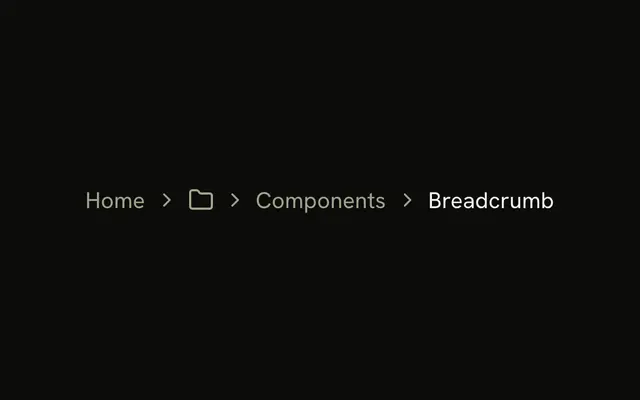
The root is a home icon, named Home for screen readers. A folder button opens Documentation, Themes, and GitHub. Components and Breadcrumb, the current page, follow it.
Use it when the root is an icon and the hidden levels must still open. An ellipsis is quieter if those levels can go. A single current section fits a Select. In Svelte, Ark UI does not list the sections.
Installation
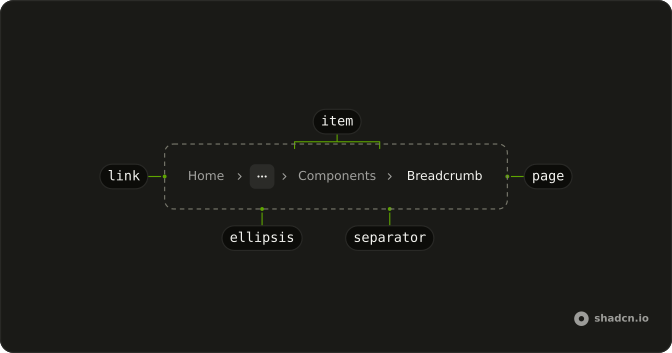
Anatomy
Usage
<Breadcrumb><BreadcrumbList><BreadcrumbItem><BreadcrumbLink>{#snippet asChild(props)}<a {...props({ "aria-label": "Home", href: "/" })}><HomeIcon aria-hidden="true" class="size-4" /></a>{/snippet}</BreadcrumbLink></BreadcrumbItem><BreadcrumbSeparator /><BreadcrumbItem><Menu positioning={{ placement: "bottom-start" }}><MenuTrigger>{#snippet asChild(props)}<button {...props({ "aria-label": "Show sections", class: "flex items-center gap-1", type: "button" })}><FolderIcon aria-hidden="true" class="size-4" /></button>{/snippet}</MenuTrigger><MenuContent><MenuGroup><MenuItem value="documentation">Documentation</MenuItem><MenuItem value="themes">Themes</MenuItem><MenuItem value="github">GitHub</MenuItem></MenuGroup></MenuContent></Menu></BreadcrumbItem><BreadcrumbSeparator /><BreadcrumbItem><BreadcrumbLink>{#snippet asChild(props)}<a {...props({ href: "/components" })}>Components</a>{/snippet}</BreadcrumbLink></BreadcrumbItem><BreadcrumbSeparator /><BreadcrumbItem><BreadcrumbPage>Breadcrumb</BreadcrumbPage></BreadcrumbItem></BreadcrumbList></Breadcrumb>FAQ
How is the folder button named?
Its only child is a FolderIcon, hidden from assistive tech, so the button carries aria-label="Show sections". Without it the button would have no name.
How is the home icon named?
The link to / holds only a HomeIcon at size-4, hidden from assistive tech, so the link carries aria-label="Home". Screen readers announce it as the Home link.
API Reference
Breadcrumb
No extra props in this demo. The rest is on the Breadcrumb page.
Menu
Sets positioning, placement, bottom-start, value="documentation", value="themes" and value="github". The rest is on the Menu page.