shadcn.io is an independent project built on shadcn/ui
Select all features sits above three indented boxes: Analytics dashboard, Advanced reporting and Data export. All three start clear, so the parent is clear too.
Use it for a bundle of features or permissions. For one choice out of several, use a Radio Group. In Svelte, Ark UI does not derive the parent from the children.
Installation
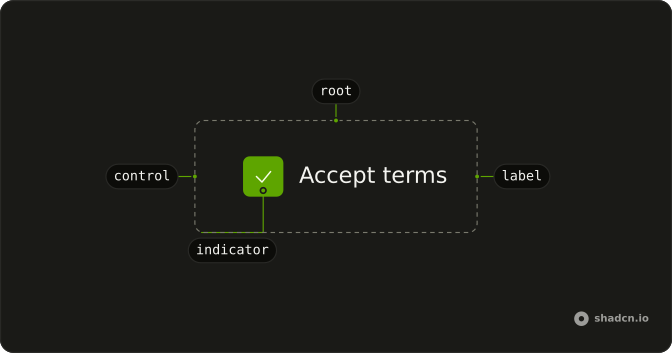
Anatomy
Usage
<FieldGroup class="w-fit gap-3"><Field orientation="horizontal"><Checkbox checked={parentChecked} name="all-features" onCheckedChange={handleParentChange} /><FieldLabel class="font-semibold">Select all features</FieldLabel></Field><FieldGroup class="ms-6 w-fit gap-2"><Field orientation="horizontal"><Checkbox checked={analytics} name="analytics" onCheckedChange={handleAnalyticsChange} /><FieldLabel>Analytics dashboard</FieldLabel></Field><Field orientation="horizontal"><Checkbox checked={reporting} name="reporting" onCheckedChange={handleReportingChange} /><FieldLabel>Advanced reporting</FieldLabel></Field><Field orientation="horizontal"><Checkbox checked={dataExport} name="data-export" onCheckedChange={handleDataExportChange} /><FieldLabel>Data export</FieldLabel></Field></FieldGroup></FieldGroup>FAQ
Should the parent checkbox show indeterminate state?
Yes. When some but not all children are checked, the parent is indeterminate rather than checked or empty, so people see a partial selection without counting.
The parent's checked is true, false or "indeterminate".
What should happen when clicking the parent checkbox?
Every child takes the parent's new value: checking it selects all, clearing it clears all. Clicking an indeterminate parent checks it, which completes the partial selection. The parent's change handler sets the three children, and the parent follows from them.
Should clicking children affect parent state?
Yes, but not by setting it. The parent's state is derived from the children each render: all checked, none, or some. Ticking a child changes the children, and the parent updates with them.
Can I nest checkboxes more than two levels deep?
You can repeat the pattern, with each parent derived from its own children, but past two or three levels it gets hard to follow. For deep hierarchies, use a Tree View with checkboxes and collapsible branches, or flatten the list into headed groups.
How do I visually indicate nesting levels?
Indent each level: the children here are a FieldGroup with ms-6, a logical margin that flips in right-to-left pages. A heavier parent label helps, and border-s ps-4 on the child group adds a guide line.
Are nested checkbox lists accessible?
Every checkbox has its own label, Tab moves from the parent through the children, and Space toggles. Screen readers announce the indeterminate parent as mixed or partially checked. The indent is only visual, so a parent label that says what it controls (Select all features) carries the relationship.
API Reference
Field
Sets orientation="horizontal". The rest is on the Field page.
Checkbox
Sets checked={parentChecked}, name="all-features", onCheckedChange={handleParentChange}, checked={analytics}, name="analytics" and onCheckedChange={handleAnalyticsChange}. The rest is on the Checkbox page.