shadcn.io is an independent project built on shadcn/ui
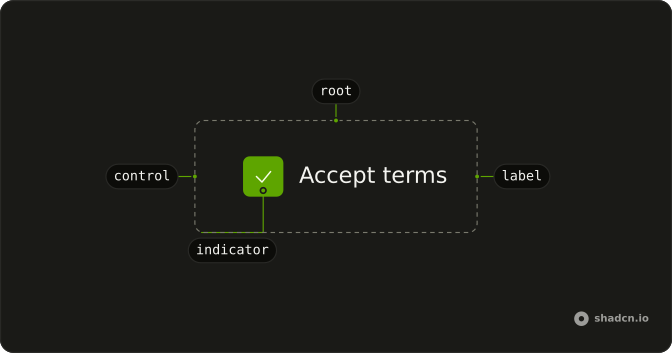
A single checkbox labeled Custom green checkmark. Checked, the box fills green. Until then it looks like an ordinary outline.
Use the green fill when checked should read as done, such as a completed step. For a status that is not a choice, use a Badge. Ark UI on Svelte does not ship a green checkbox.
Installation
Anatomy
Usage
<Field class="w-fit" orientation="horizontal"><Checkbox class="data-checked:border-success data-checked:bg-success" name="custom" /><FieldLabel>Custom green checkmark</FieldLabel></Field>FAQ
How do I change checkbox colors?
Prefix the classes with the checked variant so they only apply when the box is ticked, here bg-success and border-success. Your classes override the checkbox's own, and no conditional logic is needed. The success color is a theme token: add --success to your theme if it doesn't have one, or use another token like primary or destructive.
The box carries data-state="checked", which the data-checked: variant matches.
Can I use different icons instead of Check?
The Checkbox draws its own indicator, a Lucide CheckIcon, and doesn't take one as children. To use another icon, edit the indicator in the checkbox file in your components/ui folder, or add a variant there for the boxes that need it.
How do I make custom-styled checkboxes larger or smaller?
Add a size class to the Checkbox, such as size-5. The check icon's size is set in the checkbox's styles, so for a much larger box enlarge the icon there too. Bigger boxes help on touch screens; in dense tables the default size is usually right.
Can I create theme-based checkbox color schemes?
Yes: use theme tokens rather than fixed colors. bg-success reads the --success variable, so light and dark themes can each set their own green. To change every checkbox, edit the checked classes in the checkbox file instead of repeating them on each one.
API Reference
Field
Sets orientation="horizontal". The rest is on the Field page.
Checkbox
Sets name="custom". The rest is on the Checkbox page.