shadcn.io is an independent project built on shadcn/ui
Subscribe opens Subscribe to our newsletter. The only field is Email address, with the placeholder you@example.com. Maybe Later and Subscribe sit under it.
Use it when signup should be a single field. A note tied to one button can live in a Popover instead. In Svelte, Ark UI does not add the address to a list.
Installation
Anatomy
Usage
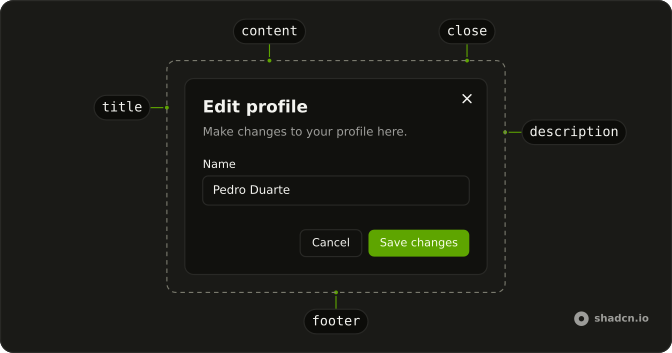
<Dialog><DialogTrigger>{#snippet asChild(props)}<Button {...props()} variant="outline">Subscribe</Button>{/snippet}</DialogTrigger><DialogContent class="sm:max-w-md"><DialogHeader><DialogTitle>Subscribe to our newsletter</DialogTitle><DialogDescription>Get the latest updates and news delivered to your inbox.</DialogDescription></DialogHeader><Field><FieldLabel>Email address</FieldLabel><Input autocomplete="email" name="email" placeholder="you@example.com" type="email" /></Field><DialogFooter><DialogClose>{#snippet asChild(props)}<Button {...props()} variant="outline">Maybe Later</Button>{/snippet}</DialogClose><Button>Subscribe</Button></DialogFooter></DialogContent></Dialog>FAQ
How do I validate the email?
type="email" gives you the browser's check and the right mobile keyboard. Disable Subscribe until the address is valid and show a FieldError otherwise.
What happens after subscribing?
Close the dialog and confirm with a toast, or swap the content for a thank-you. Send a confirmation email for double opt-in. Pass open and update it in onOpenChange, which receives { open }.
Should I link the privacy policy?
Yes. Add a line under the field saying what you'll send and linking your policy; some regions require explicit consent.
Should it open when people try to leave?
Sparingly, if at all: once per visitor, and never again after they decline.
API Reference
Dialog
No extra props in this demo. The rest is on the Dialog page.
Button
Sets props and variant="outline". The rest is on the Button page.
Field
No extra props in this demo. The rest is on the Field page.
Input
Sets autocomplete="email", name="email", placeholder="you@example.com" and type="email". The rest is on the Input page.