shadcn.io is an independent project built on shadcn/ui
Filter opens Filter Options. Three checkboxes are listed: Active, Pending, and Archived. Active starts checked. Apply Filters spans the panel and closes it.
Use it to keep filters next to the list they narrow, instead of in a sidebar. Apply does not filter the list until you read the boxes. A filter that is the whole page fits a Sheet. In Svelte, Ark UI does not apply the filters.
Installation
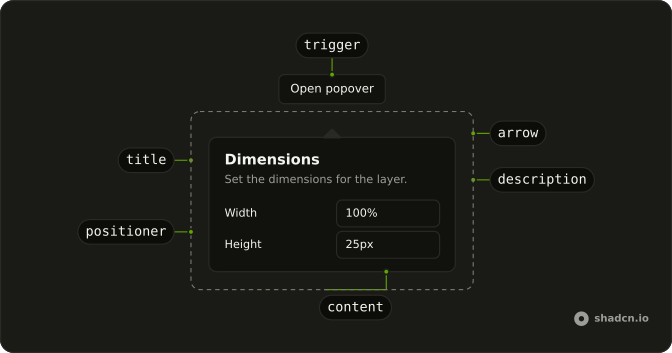
Anatomy
Usage
<Popover><PopoverTrigger>{#snippet asChild(props)}<Button {...props()} variant="outline"><FilterIcon aria-hidden="true" data-icon="inline-start" />Filter</Button>{/snippet}</PopoverTrigger><PopoverContent class="w-80 max-w-full"><PopoverTitle>Filter Options</PopoverTitle><FieldGroup class="gap-3">{#each statuses as status (status.value)}<Field orientation="horizontal"><Checkbox defaultChecked={status.checked} name="status" value={status.value} /><FieldLabel class="font-normal">{status.label}</FieldLabel></Field>{/each}</FieldGroup><PopoverClose>{#snippet asChild(props)}<Button {...props({ class: "w-full" })} size="sm">Apply Filters</Button>{/snippet}</PopoverClose></PopoverContent></Popover>FAQ
How are the status checkboxes built?
statuses lists Active, Pending and Archived. Each row is a Field with orientation="horizontal", a Checkbox named status with the status as its value, and a FieldLabel.
Which filter starts checked?
Active, whose entry has checked: true. Pending and Archived start unchecked. The checkboxes take it as their starting value only, so they stay uncontrolled.
The prop is defaultChecked on Checkbox.
How do I close this panel from code?
Apply Filters closes the panel.
Here each button sits in PopoverClose, which closes the panel without any state. To close it from your own code, control the open state on Popover.
Pass open and onOpenChange on Popover. The callback gets { open }.
How does the Filter button become the trigger?
The trigger is a Button with variant="outline". FilterIcon has aria-hidden="true" and data-icon="inline-start", and the label is Filter. PopoverContent is w-80 max-w-full, and PopoverTitle reads Filter Options.
asChild is a snippet on PopoverTrigger that renders the button, and PopoverContent is the panel.
API Reference
Popover
No extra props in this demo. The rest is on the Popover page.
Button
Sets props, variant="outline", w-full and size="sm". The rest is on the Button page.
Field
Sets orientation="horizontal". The rest is on the Field page.
Checkbox
Sets defaultChecked={status.checked}, name="status" and value={status.value}. The rest is on the Checkbox page.