shadcn.io is an independent project built on shadcn/ui
View Items opens three rows: Item 1, Item 2, and Item 3. The title Items is hidden and read by screen readers.
Use it to show a handful of related entries next to the control that counts them. A longer list belongs in a Dialog. In Svelte, Ark UI does not load the rows.
Installation
Anatomy
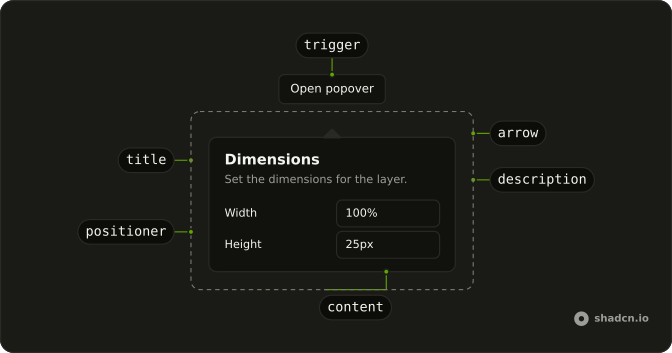
Usage
<Popover><PopoverTrigger>{#snippet asChild(props)}<Button {...props()} variant="outline">View Items</Button>{/snippet}</PopoverTrigger><PopoverContent><PopoverTitle class="sr-only">Items</PopoverTitle><ul class="flex flex-col gap-2">{#each items as item (item)}<li>{item}</li>{/each}</ul></PopoverContent></Popover>FAQ
How is the list marked up?
The items are the strings Item 1, Item 2, and Item 3, mapped into li elements. The list is a ul with flex flex-col gap-2. PopoverTitle reads Items and has className="sr-only".
How does View Items become the trigger?
The trigger is a Button with variant="outline" and the label View Items. Activating it opens the panel. The three strings live in an items array outside the component.
asChild is a snippet on PopoverTrigger that renders the button, and PopoverContent is the panel.
What does a row contain?
Each row is an li with text. gap-2 on the ul is the space between Item 1, Item 2, and Item 3. This file leaves the rows as text.
What names the list panel?
PopoverTitle is Items, with className="sr-only". The button says View Items. The visible content is the three list rows.
API Reference
Popover
No extra props in this demo. The rest is on the Popover page.
Button
Sets props and variant="outline". The rest is on the Button page.