shadcn.io is an independent project built on shadcn/ui
View opens a Layout label and three radio rows: Grid, List and Columns. Grid starts checked. Choosing another clears Grid.
Use radio rows when exactly one layout should be active. Checkbox rows fit if several panels can be on at once, as in a Checkbox list. On Svelte, Ark UI does not store the layout after a refresh.
Installation
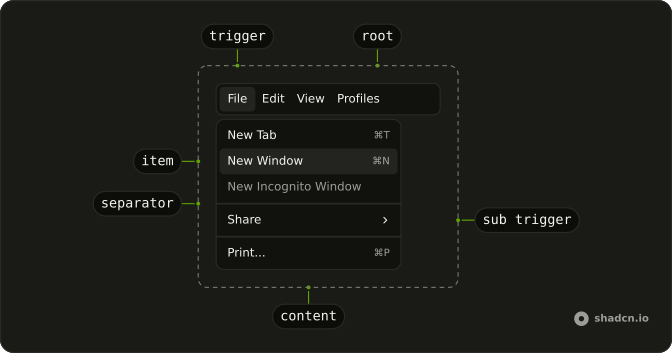
Anatomy
Usage
<Menubar><MenubarMenu><MenubarTrigger>View</MenubarTrigger><MenubarContent><MenubarRadioGroup onValueChange={handleLayoutChange} value={layout}><MenubarLabel>Layout</MenubarLabel><MenubarRadioItem value="grid">Grid</MenubarRadioItem><MenubarRadioItem value="list">List</MenubarRadioItem><MenubarRadioItem value="columns">Columns</MenubarRadioItem></MenubarRadioGroup></MenubarContent></MenubarMenu></Menubar>FAQ
How does the layout choice stay selected?
The layout is one value, grid to start, kept in the component, so the check is still on it when View reopens.
MenubarRadioGroup takes value, and onValueChange receives details.value. Each MenubarRadioItem has its value.
What happens when I choose List?
The value becomes list, the check moves from Grid to List, and the menu closes. Switch your view where the value changes.
How do I add a command that is not a layout?
Put a MenubarSeparator after the radio group, then a plain MenubarItem, such as Refresh. It runs an action and doesn't take part in the choice.
API Reference
Menubar
Sets onValueChange={handleLayoutChange}, value={layout}, value="grid", value="list" and value="columns". The rest is on the Menubar page.