shadcn.io is an independent project built on shadcn/ui
Edit opens two labeled groups. Actions lists Cut, Copy and Paste. A separator, then History lists Undo and Redo. The labels are not commands.
Group commands under labels when a menu mixes two jobs, such as editing and history. A Dropdown Menu can use the same groups off one button. In Svelte, Ark UI does not run Undo or Redo.
Installation
Anatomy
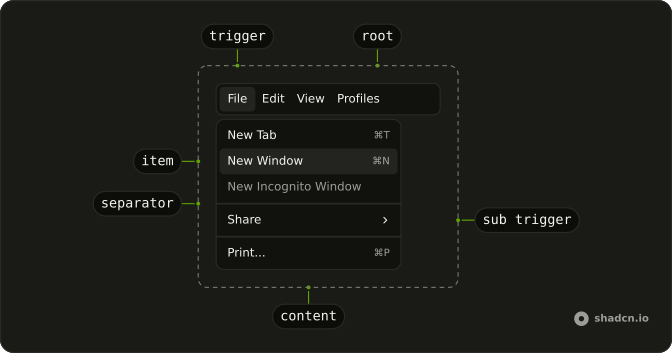
Usage
<Menubar><MenubarMenu><MenubarTrigger>Edit</MenubarTrigger><MenubarContent><MenubarGroup><MenubarLabel>Actions</MenubarLabel><MenubarItem value="cut">Cut</MenubarItem><MenubarItem value="copy">Copy</MenubarItem><MenubarItem value="paste">Paste</MenubarItem></MenubarGroup><MenubarSeparator /><MenubarGroup><MenubarLabel>History</MenubarLabel><MenubarItem value="undo">Undo</MenubarItem><MenubarItem value="redo">Redo</MenubarItem></MenubarGroup></MenubarContent></MenubarMenu></Menubar>FAQ
How are Actions and History split?
Each section is a MenubarGroup that starts with its MenubarLabel, with a MenubarSeparator between the two groups.
Is the section label a command?
No. A MenubarLabel names its group; nothing happens when you click it.
What does the separator separate?
The Actions group from the History group: Paste above the line, the History label below it.
API Reference
Menubar
Sets value="cut", value="copy", value="paste", value="undo" and value="redo". The rest is on the Menubar page.