shadcn.io is an independent project built on shadcn/ui
Six radios in two columns: Option 1 through Option 6. Option 1 starts selected. Each label sits beside its radio.
Use a grid when a longer single choice should not run down the page. A Select is smaller once the list passes a handful of options. In Svelte, Ark UI does not set the two columns.
Installation
Anatomy
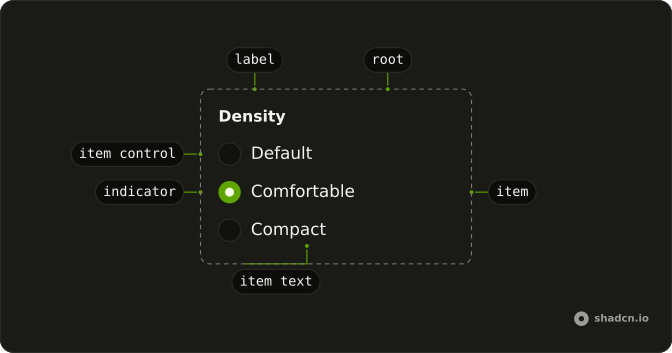
Usage
<RadioGroup class="w-fit grid-cols-2 gap-x-8 gap-y-4" defaultValue="grid-1">{#each options as option (option.value)}<RadioGroupItem value={option.value}>{option.label}</RadioGroupItem>{/each}</RadioGroup>FAQ
How do I get two columns?
RadioGroup is already a grid, and grid-cols-2 gives it two columns. Six items fill three rows: Option 1 beside Option 2, then 3 beside 4, then 5 beside 6. Change grid-cols-2 for another count, such as grid-cols-1 sm:grid-cols-3.
Which option starts selected?
defaultValue is grid-1, the same string as the first item's value. The values run from grid-1 through grid-6 and come from a list at the top of the file.
Why does the label text select the radio?
The text is the item's label, so clicking it checks that item. The text is the child of RadioGroupItem, which renders it as the item's label.
Which way do the arrow keys move?
They follow the items in source order: Option 1, Option 2, Option 3, and so on. That is across the row, then the next row. Space checks the focused item.
API Reference
Radio Group
Sets defaultValue="grid-1" and value={option.value}. The rest is on the Radio Group page.