shadcn.io is an independent project built on shadcn/ui
Login and Register share the row in two equal halves. Login is selected and shows Email, Password and a Login button. Register adds Full Name and Bio, and its button says Create Account.
Use two tabs when sign-in and sign-up should share one box. A Dialog works if each form should open on its own. Ark UI in Svelte does not submit either form.
Installation
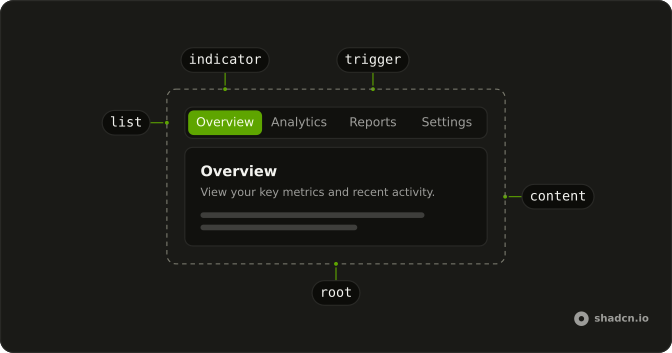
Anatomy
Usage
<Tabs class="w-full max-w-md" defaultValue="login"><TabsList class="grid w-full grid-cols-2"><TabsTrigger value="login">Login</TabsTrigger><TabsTrigger value="register">Register</TabsTrigger></TabsList><TabsContent value="login"><div class="rounded-lg border bg-card p-6 text-card-foreground shadow-sm"><div class="mb-4"><h3 class="font-semibold text-lg">Login</h3><p class="text-muted-foreground text-sm">Enter your credentials to access your account.</p></div><form onsubmit={handleSubmit}><FieldGroup class="gap-4"><Field><FieldLabel>Email</FieldLabel><Input placeholder="name@example.com" type="email" /></Field><Field><FieldLabel>Password</FieldLabel><Input type="password" /></Field><Button class="w-full" type="submit">Sign In</Button></FieldGroup></form></div></TabsContent><TabsContent value="register"><div class="rounded-lg border bg-card p-6 text-card-foreground shadow-sm"><div class="mb-4"><h3 class="font-semibold text-lg">Create Account</h3><p class="text-muted-foreground text-sm">Fill in the details below to create your account.</p></div><form onsubmit={handleSubmit}><FieldGroup class="gap-4"><Field><FieldLabel>Full Name</FieldLabel><Input placeholder="John Doe" type="text" /></Field><Field><FieldLabel>Email</FieldLabel><Input placeholder="name@example.com" type="email" /></Field><Field><FieldLabel>Password</FieldLabel><Input type="password" /></Field><Field><FieldLabel>Bio</FieldLabel><Textarea placeholder="Tell us about yourself..." /></Field><Button class="w-full" type="submit">Create Account</Button></FieldGroup></form></div></TabsContent></Tabs>FAQ
How do Login and Register share the width?
TabsList has grid w-full grid-cols-2, so each trigger takes half. Login is the default, and the group is w-full max-w-md.
Which fields are in each form?
Login has Email and Password. Register has Full Name, Email, Password and Bio. Bio is a Textarea, and the rest are inputs with type set to text, email or password.
How are the labels tied to the inputs?
Each pair sits in a Field with a FieldLabel.
The field links its label and input, so no id is needed.
What happens on submit?
Both forms call one handler that prevents the default submit, so the page does not reload. Sign In and Create Account are full-width submit buttons. Read the form data and send it in that handler.
API Reference
Tabs
Sets defaultValue="login", value="login" and value="register". The rest is on the Tabs page.
Field
No extra props in this demo. The rest is on the Field page.
Input
Sets placeholder="name@example.com", type="email", type="password", placeholder="John Doe" and type="text". The rest is on the Input page.
Button
Sets type="submit". The rest is on the Button page.
Textarea
Sets placeholder="Tell us about yourself...". The rest is on the Textarea page.