shadcn.io is an independent project built on shadcn/ui
Profile, Security, Preferences and Team stack in a column beside the panel. Profile is selected. The panel is titled Profile Settings and follows with a short paragraph.
Stack the tabs when the list should read like a sidebar, such as settings. A Navigation Menu fits if each item is a separate page. Base UI in React does not turn the list into a sidebar.
Installation
Anatomy
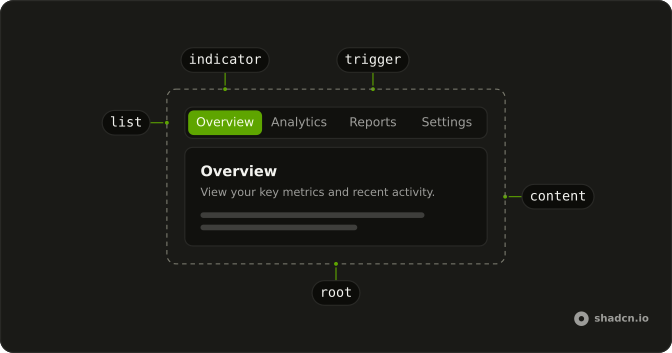
Usage
<Tabs
  className="w-full max-w-2xl gap-6"
  defaultValue="profile"
  orientation="vertical"
>
  <TabsList>
    {sections.map((section) => (
      <TabsTrigger key={section.value} value={section.value}>
        {section.label}
      </TabsTrigger>
    ))}
  </TabsList>
  {sections.map((section) => (
    <TabsContent key={section.value} value={section.value}>
      <div className="rounded-lg border bg-card p-6 text-card-foreground shadow-sm">
        <h3 className="mb-2 font-semibold text-lg">{section.title}</h3>
        <p className="text-muted-foreground text-sm">{section.description}</p>
      </div>
    </TabsContent>
  ))}
</Tabs>
FAQ
How does this demo put the triggers in a column?
orientation="vertical" on Tabs. The tabs then sit in a row with the panel, the list stacks its triggers, and each trigger fills the list's width with its label at the start.
Do Up and Down move between these triggers?
Yes. The orientation is vertical, so Up and Down move between triggers, and Home and End jump to the first and last.
Focusing a trigger selects it, as on the other bases: TabsList turns on Base UI's activateOnFocus. Set activateOnFocus={false} to select only with Enter or Space.
Which sections are in the list?
Profile, Security, Preferences and Team, built from a sections array. Profile is the default, and each panel is a bordered bg-card block with an h3 and a muted paragraph.
API Reference
Tabs
Sets defaultValue="profile", orientation="vertical" and value={section.value}. The rest is on the Tabs page.