shadcn.io is an independent project built on shadcn/ui
Invite Team opens Invite team members. Three email fields use colleague, teammate, and partner placeholders. Send Invitations sits above a divider that reads Or share link, then a read-only invite URL and Copy.
Use it to invite people without opening settings. Copy does not write to the clipboard until you add that. A role beside each email fits a Select. In Vue, Ark UI does not send the invites.
Installation
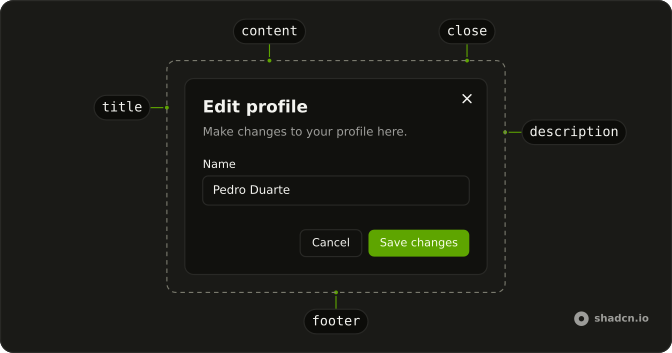
Anatomy
Usage
<Dialog>
  <DialogTrigger :asChild="true">
    <Button variant="outline">Invite Team</Button>
  </DialogTrigger>
  <DialogContent class="sm:max-w-lg">
    <DialogHeader>
      <DialogTitle>Invite team members</DialogTitle>
      <DialogDescription>
        Invite your team members to collaborate on this project.
      </DialogDescription>
    </DialogHeader>
    <FieldGroup>
      <Field v-for="invitee in invitees" :key="invitee.name">
        <FieldLabel>Email address</FieldLabel>
        <Input :name="invitee.name" :placeholder="invitee.placeholder" type="email" />
      </Field>
      <Button class="w-full">Send Invitations</Button>
      <FieldSeparator>Or share link</FieldSeparator>
      <Field>
        <FieldLabel class="sr-only">Invite link</FieldLabel>
        <div class="flex items-center gap-2">
          <Input class="flex-1" :readOnly="true" type="text" :value="inviteLink" />
          <Button size="sm" variant="outline">Copy</Button>
        </div>
        <FieldDescription>Anyone with this link can join your team</FieldDescription>
      </Field>
    </FieldGroup>
  </DialogContent>
</Dialog>
FAQ
How do I validate the emails?
Validate each field when it loses focus and show a FieldError under the invalid ones. Empty fields are fine; disable Send Invitations until at least one address is valid.
Should invite links expire?
Yes, after a week or so, and let admins regenerate them. Say when the link expires in its FieldDescription.
How do I make Copy work?
Copy the link to the clipboard on click and confirm with a toast or a brief Copied label. The Clipboard component does this with a built-in indicator.
Can I pick a role for each invitee?
Yes: add a Select beside each email, or one default role for the whole batch.
API Reference
Dialog
Sets asChild. The rest is on the Dialog page.
Button
Sets variant="outline" and size="sm". The rest is on the Button page.
Field
Sets v-for="invitee in invitees" and key="invitee.name". The rest is on the Field page.
Input
Sets name="invitee.name", placeholder="invitee.placeholder", type="email", readOnly, type="text" and value="inviteLink". The rest is on the Input page.