shadcn.io is an independent project built on shadcn/ui
Rate Experience opens How was your experience? Five stars sit under Rating, and none are filled, so Submit Rating is off. An optional comment field is under the stars, with Cancel beside the button.
Use it for a quick score plus an optional note. Ask for the score alone in a Popover if a dialog is too heavy. In Vue, Ark UI does not store the rating.
Installation
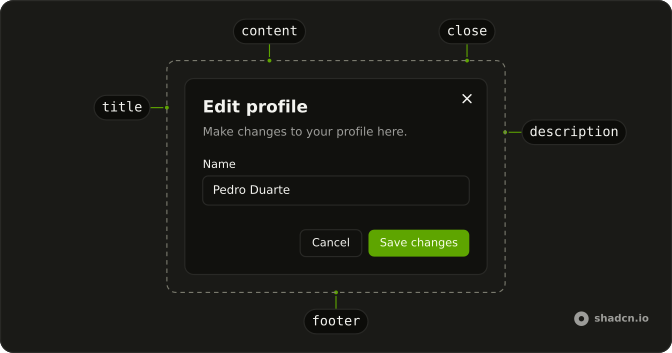
Anatomy
Usage
<Dialog>
  <DialogTrigger :asChild="true">
    <Button variant="outline">Rate Experience</Button>
  </DialogTrigger>
  <DialogContent class="sm:max-w-lg">
    <DialogHeader>
      <DialogTitle>How was your experience?</DialogTitle>
      <DialogDescription>
        Please rate your experience and share any additional feedback.
      </DialogDescription>
    </DialogHeader>
    <FieldGroup>
      <Field>
        <FieldLabel>Rating</FieldLabel>
        <Rating
          class="**:data-[slot=rating-item-indicator]:size-8"
          name="rating"
          @value-change="handleValueChange"
          :value="rating"
        />
      </Field>
      <Field>
        <FieldLabel>Additional feedback (optional)</FieldLabel>
        <Textarea
          class="min-h-25"
          name="comment"
          placeholder="Tell us more about your experience..."
        />
      </Field>
    </FieldGroup>
    <DialogFooter>
<!-- The rest of the file is under Installation. -->
FAQ
Does the rating preview on hover?
Yes. Rating highlights the stars under the pointer before a click and handles the arrow keys, so there's no hover state to manage.
How is the rating stored?
The rating is controlled: onValueChange passes the new value, and Submit Rating takes disabled while it's 0.
How are the stars made larger?
The stars use the theme's warning color, and a class on Rating sets their size: **:data-[slot=rating-item-indicator]:size-8.
API Reference
Dialog
Sets asChild. The rest is on the Dialog page.
Button
Sets variant="outline" and disabled="rating === 0". The rest is on the Button page.
Field
No extra props in this demo. The rest is on the Field page.
Rating
Sets name="rating", value-change="handleValueChange" and value="rating". The rest is on the Rating page.
Textarea
Sets name="comment" and placeholder="Tell us more about your experience...". The rest is on the Textarea page.