shadcn.io is an independent project built on shadcn/ui
Two faded rows: Disabled unchecked, empty, and Disabled checked, already ticked. Neither box can be changed.
Show a disabled box when the option should stay visible, such as a plan that does not include it. Explain the reason in a Tooltip if the box alone is not enough. In Vue, Ark UI will not toggle a disabled checkbox.
Installation
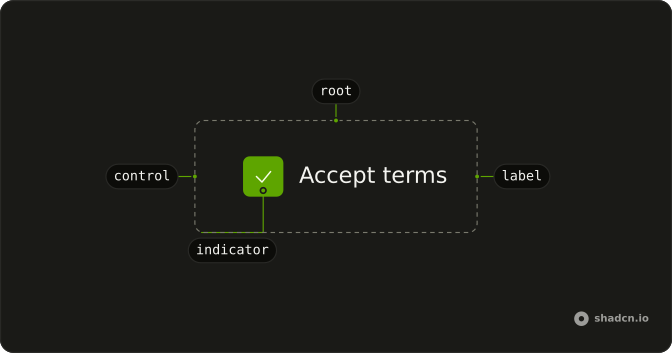
Anatomy
Usage
<FieldGroup class="w-fit gap-4">
  <Field :data-disabled="true" orientation="horizontal">
    <Checkbox :disabled="true" name="disabled" />
    <FieldLabel>Disabled unchecked</FieldLabel>
  </Field>
  <Field :data-disabled="true" orientation="horizontal">
    <Checkbox :defaultChecked="true" :disabled="true" name="disabled-checked" />
    <FieldLabel>Disabled checked</FieldLabel>
  </Field>
</FieldGroup>
FAQ
When should I disable checkboxes instead of hiding them?
Disable an option people should know exists but can't use right now: a feature on a higher plan, a choice that needs another one first, a setting that's locked. Hide it when it doesn't apply to them at all. Either way, say why nearby when it isn't obvious.
How do I show a disabled checkbox as checked?
Start it checked and disable it, as the second row does. It reads as "this is on and can't be changed", for included features or requirements already met.
Pass defaultChecked (or a controlled checked) together with disabled.
Why does the label fade too?
data-disabled on the Field dims its label to match the box. A faded box next to full-strength text looks like a bug; dimming the whole row says the entire option is unavailable.
How do I conditionally disable checkboxes based on other form state?
Compute the disabled flag from your state and pass it on every render, for example when a parent option is off or a selection limit is reached. Put the same condition on the field's data-disabled, and add a line of helper text such as "Select up to 3" so people know why.
API Reference
Field
Sets data-disabled and orientation="horizontal". The rest is on the Field page.
Checkbox
Sets disabled, name="disabled", defaultChecked and name="disabled-checked". The rest is on the Checkbox page.