shadcn.io is an independent project built on shadcn/ui
UI library: Ark UI
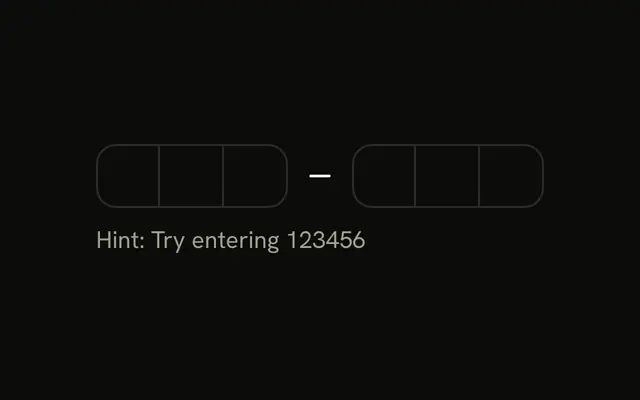
Six boxes in two groups of three. Under them a line says Numeric keyboard on mobile devices. Letters are not accepted.
Use digits only when the code is numeric. A single Input fits a long key that mixes letters and digits. In Vue, Ark UI fills the boxes when a full code is pasted.
Installation
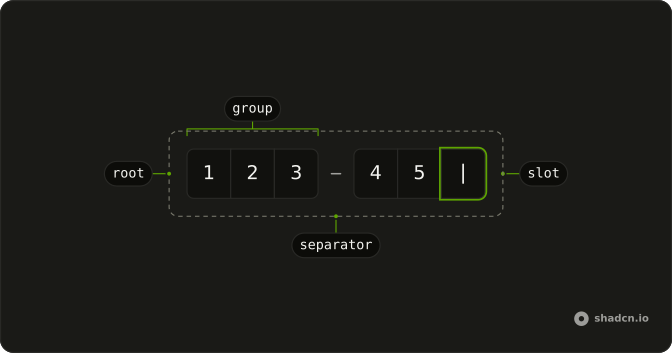
Anatomy
Usage
<div class="flex flex-col gap-2">
  <InputOTP type="numeric">
    <InputOTPGroup>
      <InputOTPSlot class="bg-background" :index="0" />
      <InputOTPSlot class="bg-background" :index="1" />
      <InputOTPSlot class="bg-background" :index="2" />
    </InputOTPGroup>
    <InputOTPSeparator />
    <InputOTPGroup>
      <InputOTPSlot class="bg-background" :index="3" />
      <InputOTPSlot class="bg-background" :index="4" />
      <InputOTPSlot class="bg-background" :index="5" />
    </InputOTPGroup>
  </InputOTP>
  <p class="text-muted-foreground text-sm">Numeric keyboard on mobile devices.</p>
</div>
FAQ
What happens when a code with spaces is pasted?
Characters that aren't digits are rejected, so paste a clean code. The Paste Optimization example strips everything but the digits before filling the field.
Can phones fill in the code from an SMS?
Yes, when the field has autocomplete one-time-code, which the component sets, iOS and Android offer the code from a recent message.
API Reference
Input OTP
Sets type="numeric", index="0", index="1", index="2", index="3" and index="4". The rest is on the Input OTP page.