shadcn.io is an independent project built on shadcn/ui
Three outline cards in a row. Each picture sits in the header. Under it: v0-1.5-sm, v0-1.5-lg or v0-2.0-mini, plus a one-line description.
Put the picture in the header when the image is the point, as with a model pick. A Card fits the same layout with a footer action. Ark UI in Vue does not crop the pictures.
Installation
Anatomy
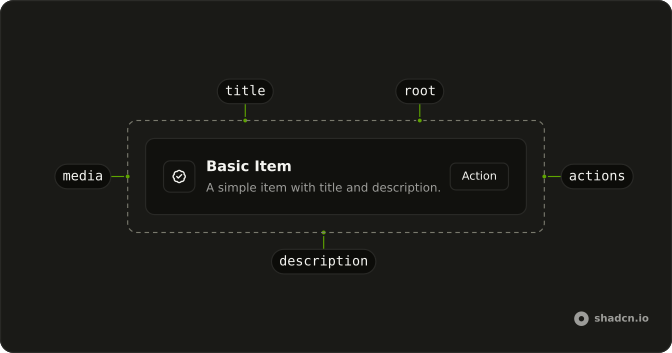
Usage
<div class="flex w-full max-w-xl flex-col gap-6">
  <ItemGroup class="grid grid-cols-3 gap-4">
    <Item
      v-for="model in MODELS"
      class="bg-background"
      :key="model.name"
      role="listitem"
      variant="outline"
    >
      <ItemHeader>
        <img
          alt=""
          class="aspect-3/2 w-full rounded-sm object-cover"
          :height="480"
          :src="model.image"
          :width="640"
        />
      </ItemHeader>
      <ItemContent>
        <ItemTitle>{{ model.name }}</ItemTitle>
        <ItemDescription>{{ model.description }}</ItemDescription>
      </ItemContent>
    </Item>
  </ItemGroup>
</div>
FAQ
When should I use ItemHeader instead of ItemMedia?
Use ItemHeader when the visual should sit above the text at full width, as in this tile grid. Use ItemMedia for a small icon, avatar, or thumbnail beside the title. ItemHeader is basis-full, so it takes the whole row.
How do the header images keep their shape?
The image has aspect-3/2, w-full and object-cover, so it fills the tile's width at a fixed ratio and crops instead of stretching. The width and height attributes give the browser that ratio before the image loads, so the grid doesn't jump.
How does ItemGroup become a grid?
ItemGroup is a flex column by default; the example adds grid grid-cols-3 gap-4 to turn it into three columns. Use responsive classes, such as one column on small screens and three from md up, if the tiles get too narrow.
What should the header image's attributes be?
Set width and height to the source's ratio, and an alt text that says what the picture shows when it carries meaning. Here the pictures are decorative and the title names the model, so alt is empty. Add loading="lazy" for grids below the fold.
API Reference
Item
Sets v-for="model in MODELS", key="model.name", role="listitem" and variant="outline". The rest is on the Item page.