shadcn.io is an independent project built on shadcn/ui
Three rows in one group, with a separator between them. Each row has an avatar, a username, a masked email and a round plus button.
Group rows when they are one list, such as people you can invite. A Table fits the same people once you need columns. In Vue, Ark UI does not load the avatars.
Installation
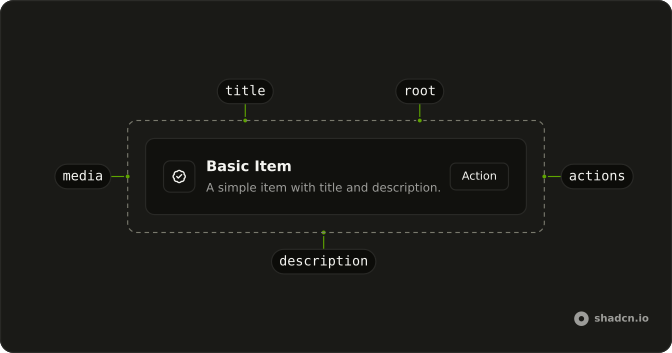
Anatomy
Usage
<div class="flex w-full max-w-md flex-col gap-6">
  <ItemGroup>
    <template v-for="(person, index) in PEOPLE" :key="person.username">
      <Item role="listitem">
        <ItemMedia>
          <Avatar>
            <AvatarImage :src="person.avatar" />
            <AvatarFallback>{{ person.username.charAt(0) }}</AvatarFallback>
          </Avatar>
        </ItemMedia>
        <ItemContent class="gap-1">
          <ItemTitle>{{ person.username }}</ItemTitle>
          <ItemDescription>{{ person.email }}</ItemDescription>
        </ItemContent>
        <ItemActions>
          <Button
            :aria-label="`Invite ${person.username}`"
            :pill="true"
            size="icon-md"
            variant="ghost"
          >
            <PlusIcon aria-hidden="true" />
          </Button>
        </ItemActions>
      </Item>
      <ItemSeparator v-if="index !== PEOPLE.length - 1" />
FAQ
When should Items go in an ItemGroup?
Whenever several rows form one list. ItemGroup stacks them with a gap that follows their size and gives the block the list role, which is why each row here has role="listitem". A single row on its own doesn't need a group.
How does ItemSeparator work between Items?
ItemSeparator is a horizontal Separator with a little vertical margin. Render it between rows, skipping the last index, so the list doesn't end with a stray rule. For rows that already have borders, as in the outline variant, you can drop the separators and rely on the group's gap.
How does the loop render a row and a separator together?
Each pass of the loop renders two siblings, the Item and its separator, keyed by the username, with no element wrapped around them. An extra wrapper would sit between the list and its items and break the layout.
A template with v-for and :key does the same.
What actions suit a grouped list?
One small action per row works best, like the icon button here. Use the icon-md size, pill for a round shape and the ghost variant so the buttons don't outweigh the names. An icon-only button needs an aria-label that names the row, such as Invite haydenbleasel.
API Reference
Item
Sets role="listitem" and v-if="index !== PEOPLE.length - 1". The rest is on the Item page.
Avatar
Sets src="person.avatar". The rest is on the Avatar page.
Button
Sets aria-label="`Invite ${person.username}`", pill, size="icon-md" and variant="ghost". The rest is on the Button page.