shadcn.io is an independent project built on shadcn/ui
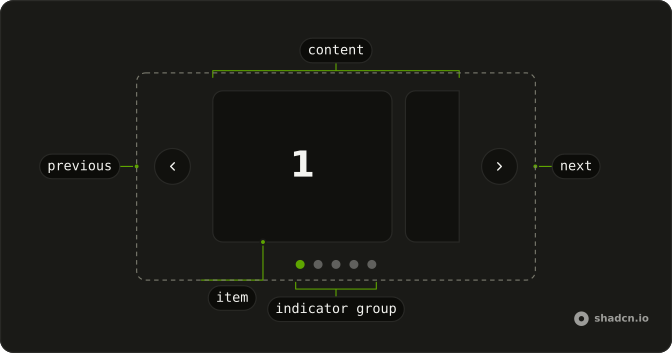
Each slide is a product card: a photo, sometimes a badge, a name, stars with a review count, a price and Add to Cart. Wireless Headphones is $199 with a New badge. Previous and next sit beside the card.
Use a product carousel for a shelf of featured items. A grid of Card components fits when every product should be visible at once. Ark UI in Vue does not add the item to a cart.
Installation
Anatomy
Usage
<div class="mx-auto w-full max-w-sm">
  <Carousel :slideCount="products.length">
    <CarouselContent>
      <CarouselItem v-for="(product, index) in products" :index="index" :key="product.name">
        <div class="overflow-hidden rounded-md border bg-background">
          <div class="relative aspect-3/2 bg-muted">
            <img
              :alt="product.name"
              class="absolute inset-0 size-full object-cover"
              :height="400"
              src="https://placehold.co/600x400"
              :width="600"
            />
            <Badge v-if="product.badge" class="absolute end-4 top-4">
              {{ product.badge }}
            </Badge>
          </div>
          <div class="flex flex-col gap-4 p-6">
            <div>
              <h3 class="mb-2 font-semibold text-lg">{{ product.name }}</h3>
              <div class="mb-2 flex items-center gap-2">
                <div class="flex items-center">
                  <StarIcon
                    v-for="star in stars"
                    aria-hidden="true"
                    :class='cn(
                      "size-4",
                      star <= Math.floor(product.rating)
                        ? "fill-primary text-primary"
                        : "fill-muted text-muted"
                    )'
<!-- The rest of the file is under Installation. -->
FAQ
When should I use a product carousel instead of a grid?
For a short, picked set of 5 to 12 items, such as deals or recommendations, where you lead the eye one product at a time. When people need to compare prices or filter, a grid works better.
How do I use my own products?
Replace the products array: each entry has a name, price, rating, reviews and a badge that can be null. Swap the placeholder image src for each product's photo, and keep alt set to the product's name.
How are the stars filled?
Five StarIcons. A star is fill-primary text-primary when its number is at most the rating rounded down, and fill-muted text-muted otherwise, so 4.6 shows four stars. The rating and the review count follow as text, which is what a screen reader reads.
When does the badge show?
When the product's badge is set. It's a Badge with absolute end-4 top-4 in the image's corner, and a null badge renders nothing.
API Reference
Carousel
Sets slideCount="products.length", v-for="(product, index) in products", index="index" and key="product.name". The rest is on the Carousel page.
Badge
Sets v-if="product.badge". The rest is on the Badge page.
Button
No extra props in this demo. The rest is on the Button page.