shadcn.io is an independent project built on shadcn/ui
Four outline buttons read top, bottom, left and right. Each tooltip names its side, such as Tooltip on top, and opens on that side of the button.
Place a tooltip on the side with room, usually the top. A Popover is the one to use if the content is taller than a line. In Vue, Ark UI does not write those side labels.
Installation
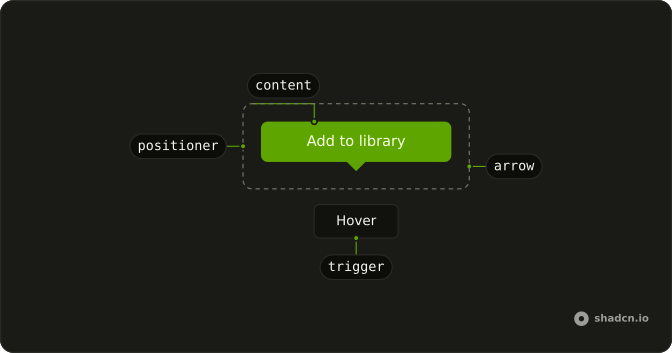
Anatomy
Usage
<div class="flex flex-wrap gap-4">
  <Tooltip v-for="side in sides" :key="side" :positioning="{ placement: side }">
    <TooltipTrigger :asChild="true">
      <Button class="capitalize" variant="outline">{{ side }}</Button>
    </TooltipTrigger>
    <TooltipContent><p>Tooltip on {{ side }}</p></TooltipContent>
  </Tooltip>
</div>
FAQ
When should I specify tooltip side positioning?
When the default would cover something people need to see, or the trigger sits near an edge: bottom for a toolbar at the top of the page, right for a sidebar on the left. Leave it unset for most triggers.
Pass positioning with a placement such as bottom to Tooltip.
What is the default tooltip position if side is not specified?
The top: the Tooltip opens above its trigger and centers on it.
How does automatic collision detection work with side?
When the Tooltip would overflow the viewport on the side you chose, it flips to the opposite side and shifts along the edge to stay visible. Scroll the trigger toward an edge to see it flip.
Can I control tooltip alignment along the side?
Yes, it is centered by default and can align with the start or the end of the trigger.
Use a placement such as top-start or bottom-end.
API Reference
Tooltip
Sets v-for="side in sides", key="side", positioning="{ placement: side }" and asChild. The rest is on the Tooltip page.
Button
Sets variant="outline". The rest is on the Button page.