Tables blocks for every framework.
100 tables sections for React, Vue, Svelte and Solid, ready to paste into a page. Table sections: data tables with sorting, filtering, selection, pagination and row actions. Try each one right here.
Every tables block
100 blocks.
 A/B Test Traffic Split TableControls over the figuresAn experiment table where each variant has an allocation field, Control takes the rest so the split always adds to 100, a three-segment band draws it, and visitors a day and days to 10,000 follow from typed daily traffic.
 Activity Log TableLogs and historiesA workspace activity table that folds bursts: consecutive edits by one person within 15 minutes become one row with a count and a disclosure, and a switch shows every entry on its own row.
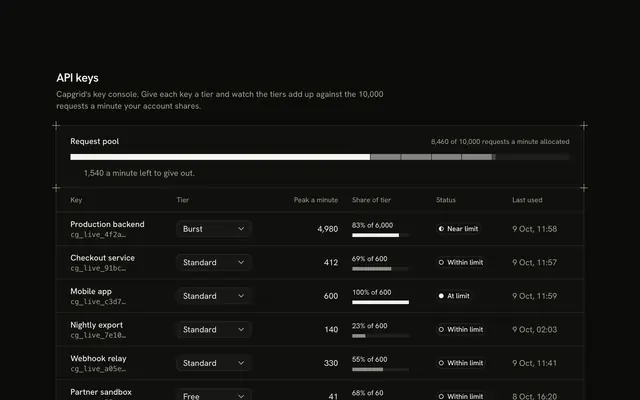 API Rate Limits TableControls over the figuresA table of API keys with a tier select in each row, a share-of-tier bar and status word per key, and a pool band that adds the tiers up against 10,000 requests a minute and says when you are over.
 API Request Log TableSort and searchAn API request log with a query-token filter bar: type status:5xx method:POST /orders, press Enter and each token becomes a removable chip that filters the requests live, with a cURL copy button on every row.
 Audit Trail TableSort and searchAn audit trail table with a strip of 14 day buttons, each a bar sized by its event count, that filters the events to one day, plus an actor menu, a sortable Time head and masked IP addresses.
 Avatar Stack TableRich cellsA sprint board whose assignee cell is a stack of initials and a plus count that opens a popover of checkboxes: ticking assigns a teammate, unticking removes them, an empty cell is a dashed circle and Unassigned.
 Badge Count TableRich cellsModeration queues as counts: compact badges like 1.2K, a quiet dash for zero, a strip of three totals and a number field that flags any queue past a limit with a flag glyph and the words Over limit, never a colour.
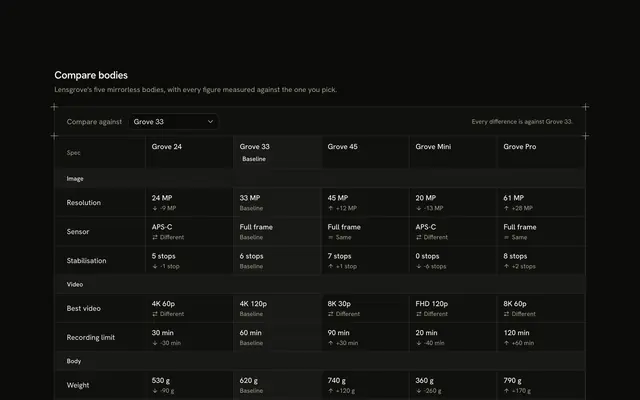 Baseline Comparison TableTotals and comparisonFive camera bodies compared against one you pick: every figure shows its own value and, under it, a signed difference or Same or Different against the baseline, with sticky spec names and grouped rows.
 Booking Slot Grid TableWindows around a tableA court booking grid in a fixed window, Monday to Friday by nine hourly slots: free slots are named Book buttons, one booking at a time shows as Yours, and the foot band cancels it.
 Budget Tracker TableMarks in cellsA production budget table in three departments with a pace tick on every spent bar, group rows with subtotals, a total row, and a toggle that adds money already promised and re-derives the bars, the remaining column and the flags.
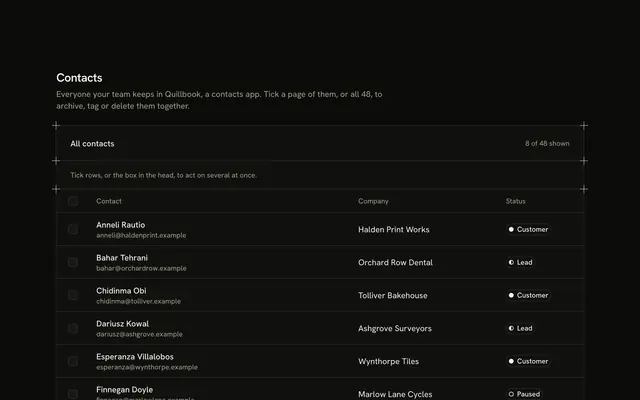 Bulk Actions TableSelect and actA contacts table whose head checkbox ticks the page, a strip that offers to select all 48 contacts across pages, a toolbar that swaps to Archive, Tag and Delete at the same height, and an Undo receipt.
 Case Timeline TableLogs and historiesA support case history as a table that reads like a timeline: a continuous rail with a node per event, Today and Yesterday day rows, times in a narrow column and chips that filter by event type with counts.
Or describe it. With Pro, your AI agent picks the block you describe and installs it on your stack.
Get ProPricing
Every tables block, one prompt away, with Pro
Your AI agent installs any of the 100 tables blocks, and every component, example and icon, with every Pro plan.
4.9/5 out of 5 · 150+ reviewsfrom 150+ founders and developers.
- Secure checkout via Stripe
- Code lives in your repo
- Keep what you've shipped if you cancel
- License terms
FAQ
Frequently asked questions
Answers on the 100 tables blocks: what they are, how to customize and install them, the license and your AI agent.
They are 100 React data table blocks, in 12 groups: sort and search, select and act, edit in place, boxes and switches, controls over the figures, rich cells, totals and comparison, marks in cells, logs and histories, columns and paging, rows that open, windows around a table. Each is a table for one job, such as sorting members, filtering bugs or paging orders, with its states drawn.
Sortable Members Table sorts by column heads, Chip Filters Table filters with chip groups, Searchable Catalogue Table searches with highlighted matches, and Paginated Orders Table pages the rows. Bulk Actions Table selects rows across pages, Editable Cells Grid Table types into cells, and Virtualized Log Table draws only the visible rows of a long list.
No. The blocks are built on native table elements with their own React state, and none of them imports TanStack Table. You can read the sorting, filtering and paging code directly, and drive the same markup from a table library if your app already uses one.
The rows are typed data at the top of the file (members, orders, bugs, logs), and column heads, captions and status lines are real markup. Nothing is fetched, and the tables keep a fixed height in every state so filtering or loading never moves the page.
In Sortable Members Table each column head is a button: the first press sorts in that column's starting order, the second reverses it and the third restores the original order. The active head carries `aria-sort`, ties fall to the member's name, and a polite line reads out each result. For server sorting, send the column and direction from the same handler and render the rows you get back.
Searchable Catalogue Table matches every typed word against a row's text, ignoring case and accents, and marks the matches. Chip Filters Table combines chips: chips in one group are or, and the two groups are and, with a count on each chip. Run the same filters on your server for big sets and keep the count and the empty state.
Paginated Orders Table has a pager of real links to `?page=n`, a rows-per-page menu and a polite line such as Page 2 of 5. Swap its typed rows for a request that reads the page and size from the search params, and keep the total count for the pager and the status line.
Virtualized Log Table draws about twenty of 5,000 lines, with spacer rows standing in for the rest, and sets `aria-rowcount` and `aria-rowindex` so a screen reader still hears row 2,500 of 5,000. Use it as the pattern for lists too long to render whole.
Bulk Actions Table ticks the page from the head box, offers Select all across pages, and swaps the toolbar for an action bar with Archive, Tag and Delete. Delete asks in an alert dialog first, and a receipt has an Undo. Call your bulk endpoints from those actions, passing the ticked ids or the filter for select all.
In Editable Cells Grid Table every number is its own field, Enter and the arrow keys move between rows, Escape puts a cell back and a dot marks cells that differ from the saved forecast. Totals are recomputed as you type. Send the changed cells from the same place you compute the difference.
This page lists 100 of the category's 100 tables blocks for React on Base UI. The category comes in React (Base UI, React Aria, Ark UI and Radix UI), Vue, Svelte and Solid; the framework and UI library pickers at the top of any block's page switch between them.
The tables blocks here are written on Base UI primitives; the layout, the copy and the theme tokens are the same on every base, and the install path follows it (/r/tables-ab-test-results.json). The other bases are one picker away from /tables-block.
Each block is TypeScript and Tailwind CSS v4, styled with your theme's tokens, and imports our components (installed with it) on Base UI. Icons come from lucide-react.
Open a block, copy its command and run it: `npx shadcn@latest add` with the block's registry URL, such as /r/tables-ab-test-results.json for A/B Test Traffic Split Table. The code is copied into your project and it's yours to edit.
The block's file and the components it imports: A/B Test Traffic Split Table brings Guides and Number Input, installed before it. Nothing else changes in your project.
Use the filters above the grid: 12 kinds of tables block, led by marks in cells (13), select and act (11), controls over the figures (11) and edit in place (10), and sort by popular or name. A good first look: A/B Test Traffic Split Table, Row Actions Table and Activity Log Table. Each card opens the block's live page.
Every block draws the same page column and side rails with a top rule only (the Guides component), so a tables block lines up with the one above and below it. Stack one per section and the rails read as a single drawing; pick across the what you do, what it shows and layout kinds.
Open its page and use the full-screen viewer (/view/tables/ab-test-results) or the device-width previews. Every preview is free for everyone; only the code needs Pro.
Each tables block uses semantic HTML: one heading level, real lists and labelled controls. Interactive parts sit on Base UI, a headless library that follows the WAI-ARIA patterns, and the layouts use logical properties so they hold in right-to-left languages.
Yes. They use semantic tokens only (bg-card, text-muted-foreground), never palette colors, so they follow your preset, radius and dark mode. The primary color marks one action per block and is never a background.
No animation library: the tables blocks' motion is CSS (transitions, entrance animations and SVG), and it stands still under prefers-reduced-motion.
The previews are free for everyone. The code of all 100 tables blocks is Pro, as is every block: Pro unlocks the code, the install command and the MCP.
Only with a Team or Organization license: client work, SaaS products and anything your users pay for. The Individual license is for personal, non-commercial projects. See the license page for the full terms.
You keep using what you installed in your existing projects, but get no new downloads or updates, and the MCP stops answering. A Lifetime license includes all future updates.
No. You can use them in your own End Products, but not redistribute the code or designs on their own, or in a UI library, kit, template or website builder.
With Pro, yes: the MCP server (22 tools, one personal URL from /dashboard/mcp) lets your agent search_blocks for a tables block, read it with get_block and install it on your React on Base UI stack.
Pass `category: "tables"` to search_blocks to search only the 100 tables blocks, or to list_blocks for the 12 groups with their blocks. get_block then returns one with its install command.
plan_page plans a page as a stack of blocks for a brief. Pass `sections` with category ids, such as ["hero", "tables", "footer"], to force the order; each section gets a pick and two alternatives, and get_block installs the stack.
4.9 out of 5 from 150+ developers


Every tables block. One prompt away.
100 tables blocks with Pro, the previews free to try. With Pro, your AI agent installs them from a prompt.
Get Pro