shadcn.io is an independent project built on shadcn/ui
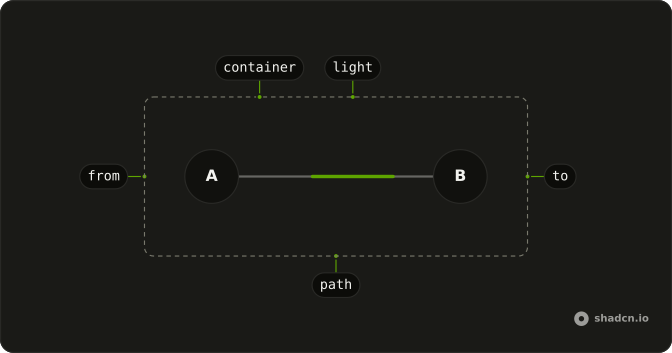
An animated beam draws a line between two elements and sends a light along it, over and over. Put it in a diagram where the direction of travel is the point: integrations feeding a hub, a request going out to a server and coming back, the stages of a pipeline.
The beam only illustrates. Nothing on it can be clicked, so links and buttons belong in the nodes. When people need to drag nodes or wire them together, use a Canvas.
Installation
Anatomy
Usage
import { AnimatedBeam } from "@/components/ui/animated-beam";Put the two ends and the beam in one container with relative, with the beam as the container's direct child, and pass the ends' ids as from and to.
<div className="relative flex h-64 w-80 items-center justify-between p-8">
  <div className="z-10 size-12 rounded-full border-2 bg-background" id="beam-a" />
  <div className="z-10 size-12 rounded-full border-2 bg-background" id="beam-b" />
  <AnimatedBeam curvature={-50} from="beam-a" to="beam-b" />
</div>
Accessibility
The beam is an svg with aria-hidden, so a screen reader skips it and reads only the nodes. Give every node a name, with visible text or a visually hidden label as the demos do, and when the connection itself carries meaning, say it in text near the diagram, because nothing else announces it. For people who ask their system for reduced motion, the light is hidden and the line stays, so the diagram still shows what is joined to what.
Demos
Multiple
Four framework icons, React, Vue, Svelte and Solid, feed a registry hub, and the hub feeds a user icon: five beams in one container, each its own AnimatedBeam with its own from and to. None of them sets curvature, yet the four side lines bend, because each line leaves its start horizontally and only runs straight when both ends sit at one height.
Reverse
A client and a server joined twice. The upper beam bows up with curvature at 30 and carries the request, while the lower one bows down, runs back with reverse and starts 1.5 seconds later through delay. startYOffset and endYOffset move each line 8 pixels off the nodes' centers so the two never overlap. Use the pair for any round trip.
Curvature
Three pairs of numbered nodes, with curvature at 60, 0 and -60. A positive number bows the line up, a negative one bows it down, and 0 draws it straight between ends at the same height. Keep one sign along a row of beams so they read as a set, and flip it only to pull two lines between the same nodes apart.
Colors
A website, a cloud and a database, joined by two beams in the theme's chart colors. gradientStartColor sets the light's tail, gradientStopColor its head and pathColor the faint line underneath, while pathWidth at 3 thickens the line and the light together. Use theme variables like these when the beams should follow dark mode, and fixed colors when they carry a brand.
FAQ
How do I connect two elements with an Animated Beam in React?
Give each end an id, then put both ends and the beam in one container with relative, the beam as that container's direct child. Pass the two ids as from and to. The beam's svg covers the container and draws the line from one element's center to the other's, so give the nodes a background and a z-index that keeps them above it.
The line is measured in the browser: a server-rendered page sends an empty svg, and the line appears once the component mounts. Each beam looks only inside its own parent, so two copies of one diagram still find their own ends, but a repeated id is invalid HTML. Build the ids from useId when the diagram can render twice on a page.
Why is my Animated Beam not showing, or drawn in the wrong place?
Check first that the beam can find its ends. It looks both ids up inside its parent element, and looks again whenever something inside that parent is added or removed, so an end that renders later, after data loads, gets its line once it appears. While either end is missing no line is drawn, and an end outside the beam's parent is never found.
When the line sits in the wrong place, check that the container has relative. The svg is positioned absolutely, so it covers the nearest positioned ancestor, while the line's coordinates are measured from the beam's parent. A line drawn across the nodes means they need a background and a z-index above the beam.
Does Animated Beam redraw when the layout changes?
Yes. A ResizeObserver watches the container and both ends, so a responsive container or a node whose label grows keeps the line attached. The beam also measures again whenever something inside the container is added, removed, or changes its text, class or style, which covers an end moved by a transform or pushed along by a sibling.
A move made by a CSS transition or animation is measured again when it ends, so the line jumps to the end's new place then rather than following it frame by frame. A change from outside the container, such as a media query that moves the nodes without resizing them, waits for the next change inside it.
How do I curve an Animated Beam up or down?
Set curvature in pixels. A positive number bows the line up, a negative one down, and the default of 0 draws it straight when both ends sit at the same height.
The line is a quadratic curve whose control point sits halfway across and curvature pixels above the start, so between level ends the curve's highest point rises half that distance: 30 pixels for a curvature of 60. The Curvature demo compares 60, 0 and -60.
How do I make the Animated Beam light run the other way?
Add reverse, and the light runs from to back to from along the same line. For traffic in both directions, draw two beams between the same ends, one with reverse and the opposite curvature, and stagger their start with delay, as the Reverse demo does.
How do I make an Animated Beam faster or slower?
Set duration, the seconds one run takes from end to end, which is 5 by default. The light is drawn as a share of the line's length, so on a long beam it is longer and covers more pixels per second than on a short beam with the same duration.
delay holds only the first run, in seconds. After that every beam repeats at its own duration, so beams with equal durations keep the gap you gave them at the start.
How do I change the colors of an Animated Beam?
Three props take any CSS color: gradientStartColor for the light's tail, gradientStopColor for its head, and pathColor for the line underneath, which pathOpacity fades to 0.2 by default. With none of them set, the whole light is the theme's primary color and the line its muted foreground.
Pass a theme variable such as var(--chart-1) and the beam follows dark mode with the rest of the page, as in the Colors demo. pathWidth sets the line and the light's width together.
What does Animated Beam do when someone prefers reduced motion?
It hides the light and keeps the line, so the diagram still shows which nodes are connected. The light only runs under the motion-safe variant and is hidden under motion-reduce, both read from the visitor's system setting by CSS alone.
Nothing else changes, and no prop turns the light back on for those visitors. If a diagram depends on the direction of travel, show that direction another way as well, with an arrow icon in the node or a caption under the diagram.
API Reference
AnimatedBeam
<svg> data-slot="animated-beam"
fromstring
The id of the element the line starts at, from its center. It's
looked up inside the beam's parent, the container that holds both ends
and the beam.
tostring
The id of the element the line ends at, at its center.
curvature?number
How far the line bends, in pixels: a positive number bows it up, a
negative one down, 0 draws it straight.
- Default
0
delay?number
How long the light waits before its first run, in seconds.
- Default
0
duration?number
How long one run from end to end takes, in seconds.
- Default
5
endXOffset?number
The horizontal nudge of the end of the line, in pixels. @default 0.
- Default
0
endYOffset?number
The vertical nudge of the end of the line, in pixels. @default 0.
- Default
0
gradientStartColor?string
The colour of the light's tail, any CSS colour. By default the theme's primary.
gradientStopColor?string
The colour of the light's head, any CSS colour. By default the theme's primary, the same as the tail.
pathColor?string
The colour of the line under the light, any CSS colour. By default the theme's muted foreground.
pathOpacity?number
How opaque the line under the light is, from 0 to 1. @default 0.2.
- Default
0.2
pathWidth?number
The line's width, in pixels. @default 2.
- Default
2
reverse?boolean
Whether the light runs from to back to from.
- Default
false
startXOffset?number
The horizontal nudge of the start of the line, in pixels. @default 0.
- Default
0
startYOffset?number
The vertical nudge of the start of the line, in pixels. @default 0.
- Default
0
className?string
Merged with the part's classes.
--animated-beam-lengthstring--animated-beam-pathstring