shadcn.io is an independent project built on shadcn/ui
A line drawn between two elements, with a light that runs along it from one to the other, again and again.
Use it in a diagram that shows how something flows: sources feeding a hub, a request going to a server and back, steps in a pipeline. The line is measured from the two elements and measured again when they change size, so it stays joined in any layout. It shows a link; it isn't one, so put anything people click in the nodes themselves. In Vue the light is a CSS animation, so nothing else is installed.
Installation
Anatomy
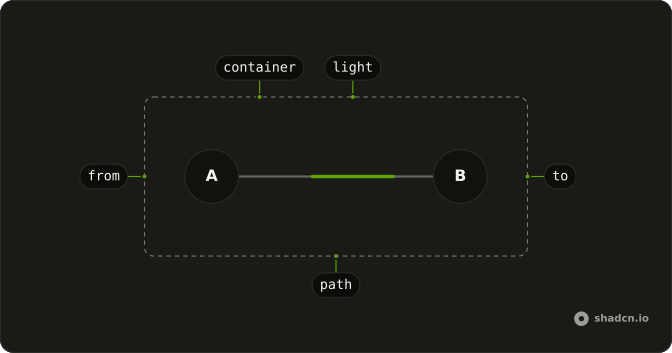
container (relative, holds the ends and the beam)
├── from (an element with an id)
├── to (an element with an id)
└── AnimatedBeam
    ├── path (the line)
    └── light (three dashes: head and tail)
Usage
<script setup lang="ts">
import { AnimatedBeam } from "@/components/ui/animated-beam";
</script>
<div className="relative flex h-64 w-80 items-center justify-between p-8">
  <div className="z-10 size-12 rounded-full border-2 bg-background" id="beam-a" />
  <div className="z-10 size-12 rounded-full border-2 bg-background" id="beam-b" />
  <AnimatedBeam curvature={-50} from="beam-a" to="beam-b" />
</div>
Accessibility
The beam is an SVG hidden from assistive tech: it's decoration over a diagram. Name the nodes themselves, with visible text or a visually hidden label as the demos do, so the diagram reads as a list of parts. With reduced motion the light stays off and only the line shows.
Demos
Multiple
Four sources joined to one hub, and the hub to one reader: five beams in one container. Each beam is its own AnimatedBeam with its own from and to, and all of them share the container. With curvature at 0 a line still bends when its ends sit at different heights, since it leaves its start level.
Reverse
A request and its response between the same two nodes. The upper beam bows up with curvature 30 and runs from client to server; the lower one bows down, runs back with reverse, and starts a second and a half later with delay. startYOffset and endYOffset nudge each line off the nodes' centers so the two don't overlap.
Curvature
Three pairs, with curvature at 60, 0 and -60: a positive number bows the line up, a negative one down, and 0 keeps it straight between ends at the same height. Keep the same sign along a row of beams so they read as one family.
Colors
Two beams with their own colours: gradientStartColor for the light's tail, gradientStopColor for its head, and pathColor for the line under it, here theme chart tokens. pathWidth thickens the line and the light together. Any CSS colour works, and a theme token follows dark mode.
FAQ
How do I connect two elements with an Animated Beam?
Give each end an id, and put both ends and the beam in one container with position relative. Pass the ids as from and to. The beam covers its container and draws the line between the two elements' centers, so keep the ends above it with a z-index and a background.
Why does it take ids and not refs in Vue?
An id reads the same in every framework, and the beam finds both ends inside its own container, where it needs them anyway. Keep the ids unique on the page: two demos with the same ids would each find their own, but the HTML would be invalid.
How do I curve the line?
Set curvature, in pixels: a positive number bows the line up, a negative one down, 0 draws it straight. The line is a quadratic curve whose control point, halfway across, sits curvature pixels above the start's height. The Curvature demo on this page compares 60, 0 and -60.
How do I make the light run the other way?
Set reverse, and the light runs from to back to from along the same line. For traffic both ways, draw two beams between the same ends, one with reverse and opposite curvature, as the Reverse demo does. delay staggers them so they don't move in step.
How do I change the beam's colours?
gradientStartColor colours the light's tail, gradientStopColor its head, and pathColor the line under it, at pathOpacity. Each takes any CSS colour, so var(--primary) or a chart token follows the theme. By default the light is the theme's primary and the line its muted foreground.
Does the beam follow its ends when the layout changes?
Yes, when a size changes: it watches the container and both ends with a ResizeObserver and measures again. An end that moves without changing size, such as one moved by a transform, isn't seen. Change from, to or curvature, or remount the beam, to draw it again.
API Reference
AnimatedBeam
<svg> data-slot="animated-beam"
fromstring
The id of the element the line starts at, from its center. It's
looked up inside the beam's parent, the container that holds both ends
and the beam.
tostring
The id of the element the line ends at, at its center.
curvature?number
How far the line bends, in pixels: a positive number bows it up, a
negative one down, 0 draws it straight.
- Default
0
delay?number
How long the light waits before its first run, in seconds.
- Default
0
duration?number
How long one run from end to end takes, in seconds.
- Default
5
endXOffset?number
The horizontal nudge of the end of the line, in pixels. @default 0.
- Default
0
endYOffset?number
The vertical nudge of the end of the line, in pixels. @default 0.
- Default
0
gradientStartColor?string
The colour of the light's tail, any CSS colour. By default the theme's primary.
gradientStopColor?string
The colour of the light's head, any CSS colour. By default the theme's foreground.
pathColor?string
The colour of the line under the light, any CSS colour. By default the theme's muted foreground.
pathOpacity?number
How opaque the line under the light is, from 0 to 1. @default 0.2.
- Default
0.2
pathWidth?number
The line's width, in pixels. @default 2.
- Default
2
reverse?boolean
Whether the light runs from to back to from.
- Default
false
startXOffset?number
The horizontal nudge of the start of the line, in pixels. @default 0.
- Default
0
startYOffset?number
The vertical nudge of the start of the line, in pixels. @default 0.
- Default
0
class?string
Merged with the part's classes.
--animated-beam-lengthstring--animated-beam-pathstring