shadcn.io is an independent project built on shadcn/ui
A card that turns to face the pointer, and its layers lift off it to different heights, like the pages of a pop-up book.
Use it for one card worth a closer look: a product, a pricing tier, a featured post. A whole grid of them gets busy, and a still Card is the better choice for content people read. In React the pointer's place goes into two CSS variables and CSS transforms do the rest, so nothing else is installed.
Installation
Anatomy
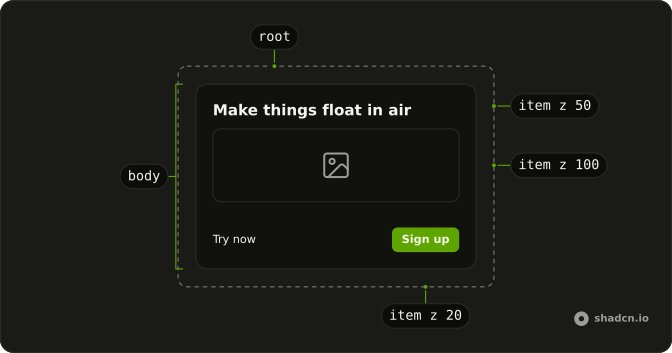
Card3D
└── Card3DBody
    └── Card3DItem (one per layer)
Usage
import {
  Card3D, Card3DBody, Card3DItem,
} from "@/components/ui/card-3d";<Card3D>
<Card3DBody className="max-w-sm rounded-xl border bg-card p-6">
<Card3DItem className="font-semibold text-xl" translateZ={50}>
Make things float in air
</Card3DItem>
<Card3DItem className="mt-4 w-full" translateZ={100}>
<img alt="Mountains above the clouds" className="rounded-lg" src="/peaks.jpg" />
</Card3DItem>
</Card3DBody>
</Card3D>Accessibility
The tilt and the depth are decoration: nothing is announced, and everything in the card reads the same when it lies flat. The tilt follows a mouse or a pen. When focus moves to a link or a button inside the card, the layers rise as they do on hover, so a keyboard user sees the same depth. With reduced motion the card stays flat and the layers stay where they are.
Demos
Rotate
Layers can turn and slide as well as rise. The badge turns with rotateZ, the photo tips back with rotateX and lifts a little with translateY, and the label shifts with translateX. Each value is the layer's pose while the card is hovered, so it settles flat again when the pointer leaves. A number is in pixels or degrees; a string such as "2rem" is used as it is.
Tilt
The same card twice: tilt set to 5 and to 20. It's how far the card turns at its edges, in degrees, and 10 by default. Keep it low for a large card or a calm page; a high value suits a small card that should feel playful.
Link
A post card whose title is the link. The layer is rendered as the anchor itself, so its depth and the link are one element and there is no wrapper to tab through. Tab to it and the layers rise, as they do under the pointer.
Card3DItem takes asChild and passes its props and depth to the one element inside it.
FAQ
How do I make a layer pop out of the 3D Card?
Wrap it in a Card3DItem and give it translateZ, how far it rises toward the viewer while the card is hovered. 40 to 100 reads well, and layers at different values part from each other. translateX, translateY and the three rotate values move it too. With no pointer over the card every layer lies flat.
How do I make the tilt stronger or subtler?
Set tilt on Card3D: the angle, in degrees, the card reaches at its edges, 10 by default. The Tilt demo on this page compares 5 and 20. The depth comes from the perspective-[1000px] class on Card3D: a smaller value makes the tilt look steeper, a larger one flatter.
Can a Card3DItem be a link, a button or an image in React?
Yes. Put the element inside a Card3DItem, or render the item as the element itself, as the Link demo on this page does for this target. The item only adds a class and a style, so the element keeps its own role, focus and events.
Why does a layer stay flat inside a wrapper?
Card3DBody keeps its direct children in 3D, so an item inside one plain wrapper still rises. An item nested deeper needs every wrapper above it to keep 3D too: add the transform-3d class to each. overflow-hidden, a filter or opacity under 1 on a wrapper flattens what's inside it.
What happens with reduced motion or on a touch screen?
With reduced motion the card never tilts and the layers stay in place. On a touch screen there's no hover: the card mostly lies flat while a finger scrolls the page, and the layers rise only when something inside takes focus. Keep everything the card says readable when it's flat.
API Reference
Card3D
<div> data-slot="card-3d"
tilt?number
How far the card turns toward the pointer at its edges, in degrees.
- Default
10
className?string
Merged with the part's classes.
Card3DBody
<div> data-slot="card-3d-body"
className?string
Merged with the part's classes.
--card-3d-tiltstringCard3DItem
<div> data-slot="card-3d-item"
rotateX?number | string
Its turn about the horizontal axis while the card is hovered: degrees as a number, or any CSS angle.
- Type
number | string- Default
0
rotateY?number | string
Its turn about the vertical axis while hovered. @default 0.
- Type
number | string- Default
0
rotateZ?number | string
Its turn in the card's plane while hovered. @default 0.
- Type
number | string- Default
0
translateX?number | string
How far it moves across while the card is hovered: pixels as a number, or any CSS length.
- Type
number | string- Default
0
translateY?number | string
How far it moves down while hovered. @default 0.
- Type
number | string- Default
0
translateZ?number | string
How far it rises toward the viewer while hovered: the depth that sets it apart from the card. 40 to 100 reads well.
- Type
number | string- Default
0
asChild?boolean
Use the provided child element as the default rendered element, combining their props and behavior.
className?string
Merged with the part's classes.
--card-3d-itemstring