shadcn.io is an independent project built on shadcn/ui
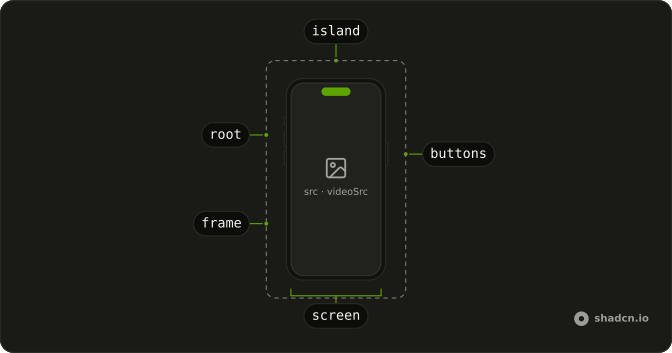
The component draws an iPhone around your screen, with flat edges, deep rounded corners, buttons on both sides and the Dynamic Island over the top of the display. Fill it with a screenshot, a screen recording or a screen built in your own markup, and it scales with the width you set. Use it wherever an iOS app needs to be seen in place, from a hero to a release note.
For an Android app, use Android. A website belongs in Safari.
Installation
Anatomy
Usage
import { Iphone } from "@/components/ui/iphone";Set the width and the height follows the phone's shape. alt tells a screen reader what the screenshot shows.
<Iphone
  alt="The home screen of the app"
  className="w-64"
  src="/screens/home.png"
/>
Accessibility
Everything drawn, the body, its buttons and the island, is an SVG marked aria-hidden, so assistive tech meets only the screen. The alt you pass labels it: it becomes the image's alt, or the video's aria-label when there is a recording, and a still under the recording is then marked as decoration. Say what the screen shows, such as a booking confirmation, or leave alt empty when the copy next to the phone already says it. Markup you pass as children is read in full and its links take focus, so when that screen is only an illustration, add inert to the phone. A recording gets a Pause video button that takes focus, or under reduced motion its own controls.
Demos
Video
A time-lapse of a red flower opening plays through videoSrc, muted, looping and cropped to the screen, with the Dynamic Island over its top and a pause button on hover. Under reduced motion it waits with its controls showing. Pick a recording for something a still can't show, such as a sheet sliding up, and keep the file small, since it loads once the phone scrolls into view.
Lock screen
A mountain photo as src, with children over it: a status bar either side of the island, the date, a large 9:41, a message from Maya, and two shortcuts. Children paint above the picture without a position of their own. Use this pairing to show a notification or a widget on a real wallpaper, and give text over a photo a shadow or a dark backing, as here.
Sizes
Three iPhones at w-24, w-36 and w-48, aligned at the bottom, each with a different image on screen. The width class is the only size each one gets, and the body, the four buttons and the island scale from it. A small phone fits beside a feature's description, and a large one suits the center of a hero.
FAQ
How do I put a screenshot in the iPhone mockup?
Pass the image as src and describe it in alt. It covers the screen with object-cover, centered, and the Dynamic Island is drawn over its top.
The screen is 391 by 843, so a full-screen capture from an iPhone 15, 1179 by 2556, loses only a few pixels at the top and bottom. A screenshot from an iPhone with an island already leaves the strip between its clock and its status icons empty, and the drawn island lands in it. For a different crop, leave src out and pass your own img as a child, with absolute inset-0 size-full object-cover and a position class such as object-top.
Does the Dynamic Island in the iPhone mockup cover my screen?
It does, as on the device. The island is drawn over the screen, about a third of its width and close to its top edge, so whatever sits in that strip is hidden behind it. It ignores the pointer, though, so a link or a button under it still takes clicks.
On a screen built in markup, keep that strip for the status bar, with the time on one side of the island and the icons on the other, as the Lock screen demo does. To drop the island, delete the SVG whose data-slot is iphone-island from the component's file.
Can the iPhone mockup play a screen recording in React?
Yes, through videoSrc. The recording is muted, loops, plays inline rather than going full screen, and is cropped to the screen under the island. The component calls play() from an effect instead of setting autoplay, so under reduced motion it stays paused with its controls showing.
It plays only while the phone is on screen, with a round pause button in the screen's bottom corner that shows on hover, on keyboard focus and on touch screens. Once paused, or when the browser blocks playback, the button stays visible as a play button. Pass a still as src too: it shows under the video until the first frame arrives.
How do I size the iPhone mockup?
Set a width, with a class like w-64 or through the element around it, and the height follows the phone's 434 by 882 shape: a 256px phone is about 520px tall. With no width class it fills its container up to 434px.
Don't set a height too. Fixing both sides stretches the screen to the new shape while the drawn body keeps its own proportions, so the screen spills past the body's edges.
Can I build the iPhone screen in markup?
Yes. Pass it as children and it fills the screen, clipped to the rounded corners, with the island on top. Give the outer element h-full and lay it out as a page about 90% as wide as the phone, 259px in a 288px phone.
Children always paint above the image and the video, so markup on top of a screenshot needs no position of its own, as in the Lock screen demo. A video's pause button sits above the children, in the bottom corner.
Does the iPhone mockup follow dark mode?
Yes. The rim and buttons are filled with border, the body with card and an empty screen with muted, so the phone is light on a light page and dark on a dark one. The island uses foreground in light mode and background in dark, which keeps it near black in both with the default palette.
With shadcn's usual class-based dark mode, adding the dark class to the phone draws it dark on any page. Restyle every phone by editing the fill classes in the component's file.
Can I show a live website inside the iPhone mockup?
Yes, with an iframe as the screen, given size-full and a title that names the site for screen readers. At its full 434px width the screen is 391px across, close to the 393px an iPhone 15 gives a web page, so the site lays itself out as it would on the phone.
Only sites that allow framing load, and many block it with their headers. Pad the top of the screen, or set a status bar above the frame, so the island doesn't sit on the page's header.
API Reference
Iphone
<div> data-slot="iphone"
alt?string
What the screenshot or video shows, read by screen readers. Leave it empty when the picture is decoration.
- Default
""
src?string
An image that fills the screen, cropped to it from the centre.
videoSrc?string
A video that fills the screen, muted and looping. It plays on its own while it's on screen, with a button to pause it, except under reduced motion, where it waits with its controls showing.
className?string
Merged with the part's classes.
data-paused?string
Present after onPause.