shadcn.io is an independent project built on shadcn/ui
Radix UI does not include this primitive, so this page uses the Ark UI component. The visuals match the Ark UI version.
QR Code turns a URL or a short piece of text into a code a phone camera can open. It fits a sign-in handoff from desktop to phone, a ticket at the door, or a link on a slide or a printed menu. Every version on this site draws it with Ark UI's QR code, as an SVG that stays sharp at any size.
When the person is already on the device that needs the link, a Clipboard button that copies it is quicker.
Installation
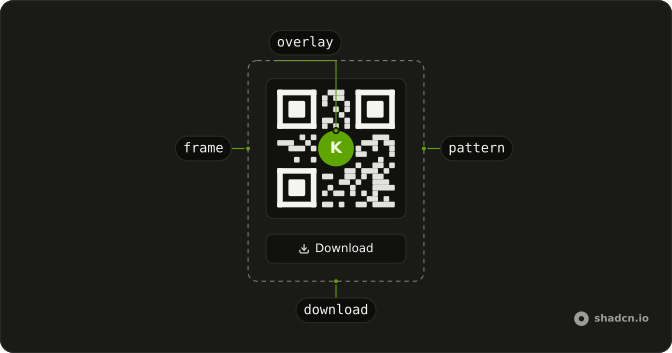
Anatomy
Usage
import { QrCode, QrCodeFrame } from "@/components/ui/qr-code";value is the text the code carries, and QrCodeFrame draws it. The label says where the code leads, for people who can't see it.
<QrCode value="https://example.com/tickets/4821">
  <QrCodeFrame aria-label="QR code for ticket 4821" role="img" />
</QrCode>
Accessibility
Ark UI draws the code as an SVG with no role or name, so it has no text alternative until you add one. Give QrCodeFrame role="img" and an aria-label that says where the code leads, and print the link or the ticket number as text beside it for anyone who can't scan. Each QrCodeDownload is a native button, so it takes focus in page order and saves the file on Enter or Space.
- Enter
- When focus is on a download button, saves the image.
- Space
- When focus is on a download button, saves the image.
Demos
Download
A card with a text field, a live code and two QrCodeDownload buttons that save it as qr-code.png and qr-code.svg. The code uses ecc M with boostEcc in encoding, and the field stops at 500 characters, inside what the encoder can hold. The empty field still draws a code, so in your own form hide the buttons until there is text to save.
Error correction
One URL drawn four times at 6rem, with ecc in encoding set to L, M, Q and H, which recover about 7, 15, 25 and 30 percent of a damaged code. L and M fit this URL in a 25-module grid while Q and H need 29, so their squares come out smaller. Pick H when a logo covers the center or the code goes to print.
Overlay
A white ticket icon in a black circle covers the center of the code through QrCodeOverlay, with ecc in encoding set to H so the code still scans. The frame and the overlay share a relative box, so the download button below them doesn't pull the icon off center. The icon's color is an attribute rather than a class, so the saved PNG keeps it.
Size
Two codes side by side, 6rem and the default 8rem, sized with the --qr-code-size variable on QrCode, and each frame gets a border from its own class. Both carry the same URL, so the grid is the same and only the squares grow. Use the smaller size in a card or a dialog, and a larger one when the phone will be held further away.
FAQ
How do I generate a QR code from a URL in React?
Pass the URL, or any text, as value on QrCode, and put a QrCodeFrame inside to draw it. The code redraws whenever value changes, so it can follow a text field, as the Download demo does.
For a code that never changes, defaultValue works too. Keep the URL short, because longer text moves the code to a larger grid of smaller squares, which needs more size on screen or a steadier hand to scan.
How do I change the size of the QR Code?
Set the --qr-code-size CSS variable on QrCode, as the Size demo does with [--qr-code-size:6rem]. It defaults to 8rem. The frame is an SVG, so it stays sharp at any size, and an overlay scales with it to a quarter of the width.
The variable sets the size on screen, while the text and the error correction decide how many modules share it. A long URL at a small size can leave each module only a pixel or two across.
How do I put a logo in the middle of a QR Code?
Put QrCodeOverlay inside QrCode, after the frame, with your img or svg in it, and set ecc in encoding to H so the code still scans with its center covered. The overlay centers on its nearest positioned box, QrCode itself, so when a button or a caption shares it, wrap the frame and the overlay in a relative element, as the Overlay demo does.
A download includes the overlay only when it is an img or an svg, and an image from another origin needs CORS to make it in. In the file the overlay's background becomes a plain square, and an icon drawn in the text color comes out black on it, so give the icon its color as an attribute, as the demo does.
Which error correction level should my QR Code use?
Set it with ecc in encoding on QrCode: L recovers about 7% of a damaged code, M 15%, Q 25% and H 30%. It defaults to L. Use H under a logo or for print, where a scuff or a fold costs modules.
Higher levels need more room, so the same text can move to a larger grid with smaller squares, as Q and H do in the Error correction demo. Add boostEcc to encoding to raise the level for free whenever the text leaves room at the same grid size.
How do I download the QR Code as a PNG or an SVG in React?
Put QrCodeDownload inside QrCode, with a fileName and a mimeType of image/png, image/jpeg or image/svg+xml. It renders a button of its own, or makes your Button the trigger through asChild, as the Download demo does. The name reaches the browser as written, so include the extension.
The file is black modules on white, whatever classes color the frame on screen, because it's drawn without the page's styles. A PNG is the code's size on screen times the display's pixel ratio, so for print use the SVG, which scales to any size. To upload or copy the image instead, call getDataUrl on the API that useQrCode() returns inside QrCode.
How much text can a QR Code hold?
At most 2,953 bytes of text at error correction L, and 1,273 at H, with the code growing to a 177-module grid on the way. Text made only of digits fits more. Past that limit the encoder throws a "Data too long" error while rendering, so cap any field that feeds it with a maximum length, as the Download demo does.
Long before the limit, the squares get too small to scan from a screen at the default 8rem. A short link to a page that holds the details scans more reliably than the details themselves.
Does the QR Code work in dark mode?
Yes, and it looks the same in both themes: QrCodeFrame keeps black modules on a white background, the contrast scanners are built for. The white frame also gives the code its quiet zone, a margin one module wide that scanners use to find its edges. Set border in encoding to 4 for the full margin the QR standard asks for.
To change the colors, pass QrCodeFrame a fill class for the modules and a background class for the frame, dark on light, and keep the contrast strong. A downloaded file ignores those classes and comes out black on white.
Is the QR Code accessible to screen reader users?
Not until you name it. The code is an SVG with no role or label, so give QrCodeFrame role="img" and an aria-label that says where it leads, such as "QR code for ticket 4821".
A label only says that the code is there. Show the link or the code it stands for as text nearby, so someone who can't scan, or is already on their phone, can still get there. The download buttons are native buttons and work with Enter and Space.
API Reference
QrCode
<div> data-slot="qr-code"
value?string
The controlled value to encode.
defaultValue?string
The initial value to encode when rendered. Use when you don't need to control the value of the qr code.
onValueChange?(details: ValueChangeDetails) → void
Callback fired when the value changes.
- Type
(details: ValueChangeDetails) → void- Parameters
details– { value: string }- Returns
void
idstring
The unique identifier of the machine.
dir?"ltr" | "rtl"
The document's text/writing direction.
- Type
"ltr" | "rtl"- Default
"ltr"
encoding?QrCodeGenerateOptions
The qr code encoding options.
ids?object
The element ids.
- Type
{ root?: string; frame?: string; overlay?: string }
pixelSize?number
The pixel size of the qr code.
asChild?boolean
Merge props onto the child element instead of rendering a host.
className?string
Merged with the part's classes.
--qr-code-sizestring--qrcode-heightstring
The height of the Root.
--qrcode-pixel-sizestring
The size of the Root.
--qrcode-widthstring
The width of the Root.
QrCodeFrame
<svg> data-slot="qr-code-frame"
asChild?boolean
Merge props onto the child element instead of rendering a host.
className?string
Merged with the part's classes.
--qr-code-sizestringQrCodePattern
<path> data-slot="qr-code-pattern"
asChild?boolean
Use the provided child element as the default rendered element, combining their props and behavior.
--qr-code-sizestringQrCodeOverlay
<div> data-slot="qr-code-overlay"
asChild?boolean
Merge props onto the child element instead of rendering a host.
className?string
Merged with the part's classes.
--qr-code-overlay-sizestringQrCodeDownload
<button> data-slot="qr-code-download-trigger"
fileNamestring
The name of the file.
mimeType"image/png" | "image/jpeg" | "image/svg+xml"
The mime type of the image.
- Type
"image/png" | "image/jpeg" | "image/svg+xml"
quality?number
The quality of the image.
asChild?boolean
Merge props onto the child element instead of rendering a host.