shadcn.io is an independent project built on shadcn/ui
A grid of images laid back and turned at an angle, its columns scrolling without end, every other one the other way.
Use it as a backdrop that says "there's a lot here": behind a hero heading, at the top of a gallery or a template library. It's decoration, so put what the page says in text over it or beside it. For a row of logos or quotes that people should read, use a Marquee. In React the scroll is a CSS animation, so nothing else is installed.
Installation
Anatomy
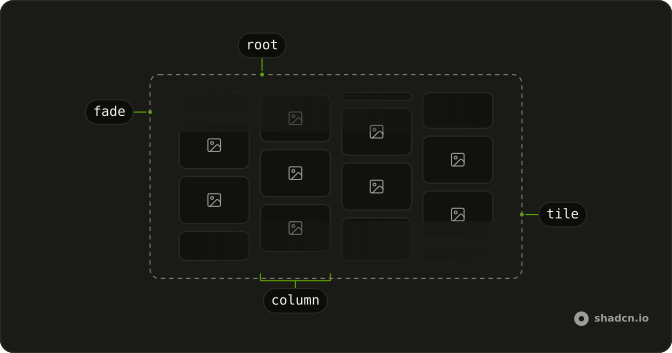
Marquee3D
└── grid
    └── column (one per column, a set of tiles three times over)
        └── tile (an image, or a colour)
Usage
import { Marquee3D } from "@/components/ui/marquee-3d";<Marquee3D className="h-96" images={["/shots/1.jpg", "/shots/2.jpg", "/shots/3.jpg"]} />Accessibility
The images are decorative: each has empty alternative text, and the repeats that make the loop are hidden from assistive tech. Say what matters in text, as the Hero demo does. The columns keep moving, so keep them out of the way of anything people read, and slow them with duration behind text. With reduced motion they hold still.
Demos
Colors
Tiles painted with colors instead of images, sixteen of them. Each value is any CSS colour; here they're theme tokens (var(--chart-1), var(--primary), var(--muted)), so the grid follows the theme and dark mode. colors wins when both it and images are given.
Reverse
Eight images in three columns, leaning the other way with reverse. columns deals the tiles out in order, and each column repeats its own until it has enough to cover the box. In a right-to-left page the grid leans the other way on its own, and reverse flips that too.
Hero
The marquee behind a heading, a line and a button: absolutely placed under the content, at reduced opacity, with a radial wash of the background behind the words. duration is 40 seconds here, slow enough not to pull the eye off the heading. The marquee fills whatever box it's given, so it covers the section at any size.
Pause on hover
pauseOnHover stops every column while the pointer is over the grid, so a tile can be looked at. The columns here run fast, at 12 seconds, which is where a pause helps most. A hovered tile still lifts toward the viewer.
FAQ
How many images does a 3D Marquee need?
8 to 16 fill the grid well. They're dealt into the columns in order, as cards around a table, and each column repeats its own images until it has at least four, so a short list still covers the box. More than 16 is fine, but most of them are off screen at any moment.
How do I slow the columns down or speed them up?
Set duration: the seconds a column takes to scroll by one set of its tiles, 20 by default. Every other column takes a quarter longer and runs the other way, so the grid never moves in step. Behind text, 30 to 40 seconds keeps it calm.
Can I use solid colours instead of images?
Yes. Pass colors, an array of CSS colours, instead of images, as the Colors demo on this page does. Theme tokens such as var(--chart-1) or var(--primary) follow the theme and dark mode. When both are given, colors wins.
Why is my 3D Marquee empty or tiny?
It fills its box and takes its size from it, not from the tiles, so give it a height: a class such as h-96, or absolute inset-0 inside a sized section. The grid scales with the box's longer side, so the tiles grow with a wide hero and shrink in a card.
Is the 3D Marquee accessible with Radix UI?
It's decorative. The images have empty alternative text, the repeats are hidden from assistive tech, and nothing in the grid takes focus. Under reduced motion the columns hold still. Put the page's message in real text over it, as in the Hero demo.
Which way does the grid lean in a right-to-left page?
The other way: in a left-to-right page the grid turns toward the end of the line, and a right-to-left page mirrors it, so the columns read from the start. reverse flips the lean in either direction. The columns' scroll is up and down, so it doesn't change.
API Reference
Marquee3D
<div> data-slot="marquee-3d"
colors?string[]
Tiles painted in a colour each instead of images: any CSS colour, such
as a theme token (var(--chart-1)). Used when given.
columns?number
How many columns the tiles are dealt into, in order: the first tile to the first column, the second to the second, and so on.
- Default
4
duration?number
The time one column takes to scroll by its own length, in seconds; every other column takes a quarter longer, the other way.
- Default
20
images?string[]
The images' URLs, one tile each. 8 to 16 fill the grid well.
pauseOnHover?boolean
Whether the columns stop while the pointer is over the grid.
- Default
false
reverse?boolean
Whether the grid leans the other way: to the start instead of the end.
- Default
false
className?string
Merged with the part's classes.
data-pause-on-hover?string
Present when pauseOnHover is true.
data-reverse?string
Present when reverse is true.
--marquee-3d-durationstring--marquee-3d-turnstring


