shadcn.io is an independent project built on shadcn/ui
Radix UI does not include this primitive, so this page uses the Ark UI component. The visuals match the Ark UI version.
A timer shows time passing on screen, counting down to zero or to a date, or up like a stopwatch, split into the units you choose, from days to milliseconds. It suits a sale that ends, a resend delay on a sign-in code, a focus session or a lap time.
When what matters is how much of a task is done rather than the clock, a Progress bar says it better.
Installation
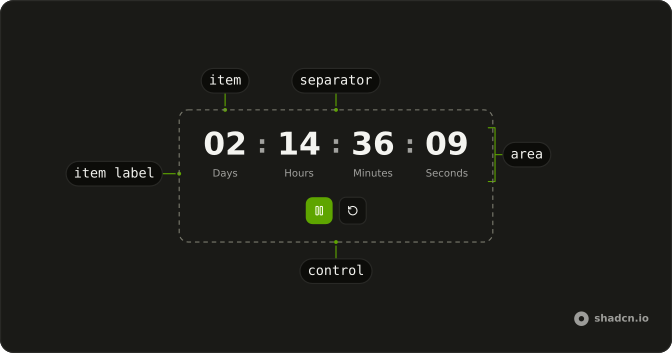
Anatomy
Usage
import {
  Timer, TimerArea, TimerItem, TimerSeparator,
} from "@/components/ui/timer";
Radix UI has no timer, so this component is Ark UI's on every base, and installing it adds @ark-ui/react to your project.
Times are in milliseconds: startMs is where the clock starts, five minutes here, and countdown runs it down to zero. Each TimerItem shows one unit of the time, so render the ones your page needs.
<Timer autoStart countdown startMs={5 * 60 * 1000}>
  <TimerArea>
    <TimerItem type="minutes" />
    <TimerSeparator />
    <TimerItem type="seconds" />
  </TimerArea>
</Timer>
Accessibility
TimerArea has the timer role and an aria-label that spells out the time, such as 0 days 00:04:59, rewritten on every tick. A timer region isn't announced as it changes, which suits a ticking clock, so tell people about the moment that matters yourself, such as the end, through a live region you fill when the timer completes. The start, pause, resume, reset and restart parts are native buttons with labels of their own. The ones that don't apply are hidden, which also takes them out of the tab order. Reword the area's label with translations.
Demos
Controlled
A stopwatch counts up from zero to the five seconds in targetMs, with Start and Reset buttons. Each tick adds one to the counter above it through onTick, and Completed appears through onComplete at the target. Use the callbacks when the page has to react. Reset carries hidden set to false, because the part hides itself once the timer completes, and it also clears the counter for another run.
Countdown
Five minutes run down in minutes and seconds as soon as the card renders, from countdown, autoStart and a startMs of five minutes in milliseconds. There are no buttons, which suits something that runs out on its own, such as a reservation hold or a resend delay. Add a TimerControl with TimerPause when a person needs to stop it.
Countdown date
The target is a date seven days ahead, printed above the clock, and remainingMsUntilDate turns it into startMs when the timer renders, so days, hours, minutes and seconds count down to it. Use this for a launch or a sale that ends. Pass the real end date rather than a duration, since every visitor arrives at a different moment and a fixed number of milliseconds goes stale.
Custom separator
TimerSeparator holds two slashes instead of its default colon, between the minutes and seconds of a five minute countdown, with no unit labels. Use your own separator to match a brand mark or a compact style. Keep it to a symbol or two, since a word in that slot reads as a sentence between two numbers. Screen readers skip the separator either way.
Interval
interval is 100 milliseconds, and the clock shows minutes, seconds and milliseconds, counting up to the one minute in targetMs once someone presses play, which turns into pause while it runs. Reset stays on screen and brings it back to zero. Use a short interval for a stopwatch where fractions matter, and keep the default of 1000 for whole seconds.
Orientation horizontal
orientation set to horizontal on each TimerItemGroup puts the unit label beside its number, on a five minute countdown. Use it where the clock sits in a toolbar or a banner and a caption under the digits would make the row too tall. The separator still sits between the groups, not between a number and its label.
Orientation vertical
orientation set to vertical, which is also the default, puts each label under its number, on the same five minute countdown as the horizontal demo, so the two can be compared. Use it when the clock is the main thing on a card and the units read as captions under large digits.
Pomodoro
A 25 minute countdown waits to be started, with large digits, a tomato emoji above them that screen readers skip, and a Focus caption below. Reset carries hidden set to false, so it stays on screen even before the first start, and Play gives way to Pause while the clock runs. Use it for a session a person starts on purpose.
FAQ
How do I make a countdown Timer in React?
Set countdown on Timer and the starting time in milliseconds with startMs, such as five minutes as 5 * 60 * 1000, as the Countdown demo does. It stops at zero, or at targetMs when you set one. A targetMs that isn't lower than a startMs above zero throws an error.
Add autoStart to start counting as soon as it renders. Without it, the clock waits for a TimerStart button, or for your code to start it.
How do I count down to a date with the Timer?
Turn the date into the milliseconds left with remainingMsUntilDate, exported from components/ui/timer, and pass the result as startMs with countdown and autoStart, as the Countdown date demo does. A date already past gives 0: the clock reads zero and completes on its first tick, so the completion callback is the place to swap in an ended message.
Compute it from the real end date each time the page loads, not from a stored duration, so every visitor sees the time left from their own moment. Show days too, or a countdown longer than a day loses them.
How do I use the Timer as a stopwatch?
Leave out countdown, and the timer counts up from startMs, which is 0 by default, until you pause it. Set targetMs to stop it at a given time, as the Interval demo does at one minute.
For fractions of a second, add a TimerItem with type set to milliseconds, which prints three digits, and lower interval, since the clock moves in whole intervals: 100 shows tenths, as the Interval demo does, and 10 shows hundredths.
How do I run code when the Timer finishes?
Pass onComplete to Timer. It fires once when the clock reaches targetMs, or zero for a countdown without one, as the Controlled demo shows. onTick fires on every update, at the rate of interval, 1000 milliseconds by default, and receives the time so far.
A stopwatch with no targetMs never completes.
How do I add start, pause and reset buttons to the Timer?
Put TimerStart, TimerPause, TimerResume, TimerReset and TimerRestart inside a TimerControl. TimerPlay is Resume while the clock is paused and Start otherwise.
Each hides itself when its action doesn't apply: Start while the clock runs or is paused, Pause while it isn't running, Reset while it is neither, which includes after the timer completes. To keep a way back to the start, set hidden to false on TimerReset, as the Controlled demo does.
Render your own Button with an icon through each part's asChild, as the demos do. Each part already has an aria-label, such as Pause, so an icon-only button keeps a name.
How do I show only minutes and seconds in the Timer?
Render only the TimerItem elements you need, each with a type such as minutes or seconds, and a TimerSeparator between them. Wrap an item and a TimerItemLabel in a TimerItemGroup to caption it.
Each unit rolls over at its own size: minutes go back to 00 at the hour, hours at the day. A 90 minute countdown that shows only minutes and seconds starts at 30:00, so show every unit the time can reach.
Does the Timer keep counting in a background tab or after a reload?
It measures the time that really passed, so a clock in a tab someone left comes back with the right value. Nothing runs while the tab is hidden, though: the ticks stop, one tick catches the clock up when the tab is visible again, and the completion callback waits until then.
A reload starts the timer over from startMs, because it keeps no state of its own. For a deadline, count down to a date, and for a session that must survive a reload, save when it started and compute startMs from that.
How do I start, pause or reset the Timer from my own code?
Inside Timer, read useTimer from a component of your own: it gives you the timer's start, pause, resume, reset and restart, along with running, paused and the current time. A keyboard shortcut or a game event can drive the clock this way.
From outside, change startMs: the timer restarts from the new value at once, even if it was waiting to be started.
API Reference
Timer
<div> data-slot="timer"
autoStart?boolean
Whether the timer should start automatically.
countdown?boolean
Whether the timer should countdown, decrementing the timer on each tick.
id?string
The unique identifier of the machine.
ids?object
The ids of the timer parts.
- Type
{ root?: string; area?: string }
interval?number
The interval in milliseconds to update the timer count.
- Default
1000
onComplete?() → void
Function invoked when the timer is completed.
- Returns
void
onTick?(details: TickDetails) → void
Function invoked when the timer ticks.
- Parameters
details– { value: number; time: Time; formattedTime: Time<string> }- Returns
void
startMs?number
The total duration of the timer in milliseconds.
targetMs?number
The minimum count of the timer in milliseconds.
translations?object
Specifies the localized strings that identifies the accessibility elements and their states.
- Type
{ areaLabel?: (time: Time, formattedTime: Time<string>) → string }
asChild?boolean
Merge props onto the child element instead of rendering a host.
className?string
Merged with the part's classes.
TimerArea
<div> data-slot="timer-area"
asChild?boolean
Merge props onto the child element instead of rendering a host.
className?string
Merged with the part's classes.
TimerControl
<div> data-slot="timer-control"
asChild?boolean
Merge props onto the child element instead of rendering a host.
className?string
Merged with the part's classes.
TimerItem
<div> data-slot="timer-item"
typekeyof Time
The unit it shows: days, hours, minutes, seconds or milliseconds.
asChild?boolean
Merge props onto the child element instead of rendering a host.
className?string
Merged with the part's classes.
data-typestring
The type of the item.
--valuestring
The current value.
TimerPlay
<button>
asChild?boolean
Merge props onto the child element instead of rendering a host.
TimerSeparator
<div> data-slot="timer-separator"
asChild?boolean
Merge props onto the child element instead of rendering a host.
className?string
Merged with the part's classes.
TimerItemGroup
<div> data-slot="timer-item-group"
orientation?"horizontal" | "vertical"
The orientation of the timer item group.
- Type
"horizontal" | "vertical"- Default
"vertical"
asChild?boolean
Merge props onto the child element instead of rendering a host.
className?string
Merged with the part's classes.
data-orientation?string
Mirrors orientation.
TimerItemLabel
<div> data-slot="timer-item-label"
asChild?boolean
Merge props onto the child element instead of rendering a host.
className?string
Merged with the part's classes.
TimerActionTrigger
<button> data-slot="timer-action"
action"start" | "pause" | "resume" | "reset" | "restart"
The action it runs: start, pause, resume, reset or restart.
- Type
"start" | "pause" | "resume" | "reset" | "restart"
asChild?boolean
Merge props onto the child element instead of rendering a host.
TimerPause
<button> data-slot="timer-pause"
asChild?boolean
Merge props onto the child element instead of rendering a host.
TimerResume
<button> data-slot="timer-resume"
asChild?boolean
Merge props onto the child element instead of rendering a host.
TimerStart
<button> data-slot="timer-start"
asChild?boolean
Merge props onto the child element instead of rendering a host.
TimerReset
<button> data-slot="timer-reset"
asChild?boolean
Merge props onto the child element instead of rendering a host.
TimerRestart
<button> data-slot="timer-restart"
asChild?boolean
Merge props onto the child element instead of rendering a host.
useTimer
autoStart?boolean
Whether the timer should start automatically.
countdown?boolean
Whether the timer should countdown, decrementing the timer on each tick.
id?string
The unique identifier of the machine.
ids?object
The ids of the timer parts.
- Type
{ root?: string; area?: string }
interval?number
The interval in milliseconds to update the timer count.
- Default
1000
onComplete?() → void
Function invoked when the timer is completed.
- Returns
void
onTick?(details: TickDetails) → void
Function invoked when the timer ticks.
- Parameters
details– { value: number; time: Time; formattedTime: Time<string> }- Returns
void
startMs?number
The total duration of the timer in milliseconds.
targetMs?number
The minimum count of the timer in milliseconds.
translations?object
Specifies the localized strings that identifies the accessibility elements and their states.
- Type
{ areaLabel?: (time: Time, formattedTime: Time<string>) → string }