shadcn.io is an independent project built on shadcn/ui
A payment card with a chip, a number, a name and a network mark on the front, and a stripe and a CVV on the back.
Use it to show the card someone is typing at checkout, or a saved card in a wallet. It draws a card and collects nothing: the numbers come from your form, and the real card field belongs to your payment provider. In Solid, the flipper is a toggle button, so the side that shows is announced and the hidden face is skipped.
Installation
Anatomy
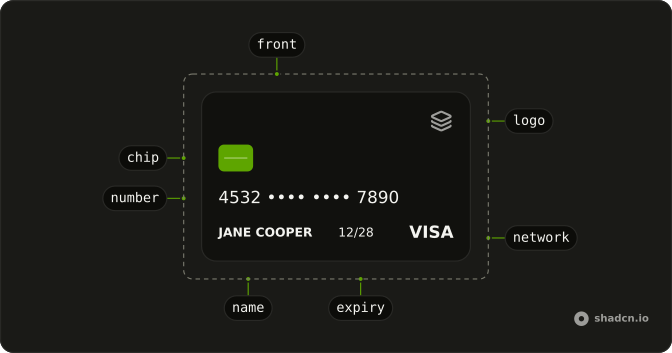
CreditCard
└── CreditCardFlipper
    ├── CreditCardFront
    │   ├── CreditCardLogo
    │   ├── CreditCardChip
    │   ├── CreditCardNumber
    │   ├── CreditCardName
    │   ├── CreditCardExpiry
    │   └── CreditCardNetwork
    └── CreditCardBack
        ├── CreditCardMagStripe
        ├── CreditCardCvv
        └── CreditCardNetwork
Usage
import {
  CreditCard, CreditCardBack, CreditCardChip, CreditCardCvv,
  CreditCardExpiry, CreditCardFlipper, CreditCardFront,
  CreditCardMagStripe, CreditCardName, CreditCardNetwork,
  CreditCardNumber,
} from "@/components/ui/credit-card";<CreditCard>
<CreditCardFlipper>
<CreditCardFront>
<CreditCardChip />
<div class="absolute inset-x-0 bottom-0 flex flex-col gap-[3.5cqw]">
<CreditCardNumber>4532 •••• •••• 7890</CreditCardNumber>
<div class="flex gap-[6cqw] pe-[22cqw]">
<CreditCardName>Jane Cooper</CreditCardName>
<CreditCardExpiry>12/28</CreditCardExpiry>
</div>
</div>
<CreditCardNetwork type="visa" />
</CreditCardFront>
<CreditCardBack>
<CreditCardMagStripe />
<CreditCardCvv class="absolute end-0 top-[44%]">123</CreditCardCvv>
</CreditCardBack>
</CreditCardFlipper>
</CreditCard>Accessibility
- Tab
- Moves focus to the card.
- Enter
- Turns the card to its other side.
- Space
- Turns the card to its other side.
Demos
Checkout
A card above four fields: the number, the name, the expiry and the CVV, each drawn on the card as it's typed. Focusing the CVV turns the card over, through flipped and onFlippedChange, and focusing any other field turns it back. trigger is click here, so the pointer passing over the card doesn't fight the form. Keep the real card data in your payment provider's field; this is the picture beside it.
Colors
Two fronts with a class on each: one on the theme's primary, with a gradient to a lighter primary, and one on the card surface with a border, its chip and logo in the muted color. The parts draw in currentColor, so the chip, the stripe and the mark follow the text color you set. Change the face, not the parts, and one class recolors the whole card.
Networks
Three fronts without a flipper, one for each type: visa, mastercard and amex. Each mark is a plain shape in the card's own color, named for screen readers, so it reads on any face. Pass your own artwork as the children of CreditCardNetwork when you need the official logo, and keep the type so the name stays right. A card without a flipper is static, so it's a picture, not a control.
FAQ
How does the Credit Card flip?
CreditCardFlipper turns while a mouse is over it, and a tap, a click, Enter or Space toggles it. Set trigger to click to stop the hover and keep only the toggle. The turn is a CSS transform that mirrors in a right-to-left page and becomes an instant swap under reduced motion.
How do I flip the card from my own code in Solid?
Pass flipped and onFlippedChange to CreditCardFlipper, as the Checkout demo does to show the back while the CVV field has focus. Without them it keeps its own state, and defaultFlipped picks the side it starts on.
Which card networks does CreditCardNetwork draw?
Visa, Mastercard and American Express, as simple marks in the card's text color, each with an accessible name. They're stand-ins, not the networks' official logos. For those, put the artwork your payment provider gives you inside CreditCardNetwork and keep type set, so the name is still right.
How do I make the Credit Card bigger or smaller?
Set a width on CreditCard: it keeps a real card's proportions and is at most max-w-96 until you change that. The text, the chip and the corners are sized in container units, so everything scales with the width. safeArea on a face changes the margin kept clear inside the edge.
Is it safe to show a card number with Credit Card?
It only draws what you pass it. Show the last four digits of a saved card, and draw a number that's being typed from your own form state. The card field that sends the number should be your payment provider's, so the full number never passes through your page's code.
How do I change the colors with Ark UI?
Add classes to CreditCardFront and CreditCardBack, such as a gradient on the primary color, as the Colors demo does. The chip, the stripe and the network mark use currentColor, so set the text color on the face too. Edit the face classes in the file under components/ui to change every card.
API Reference
CreditCard
<div> data-slot="credit-card"
asChild?(props: ParentProps) => JSX.Element
Render your own element: a function that gets the part's props to spread on it.
- Type
(props: ParentProps) => JSX.Element
class?string
Merged with the part's classes.
CreditCardFlipper
flipped?boolean
Whether the back is showing (controlled).
defaultFlipped?boolean
The face to start on when uncontrolled: true shows the back.
- Default
false
onFlippedChange?(flipped: boolean) → void
Called with the new side whenever it would flip.
- Parameters
flipped– boolean- Returns
void
trigger?"click" | "hover"
What flips the card. hover turns it while a mouse is over it, and a
tap, a click, Enter or Space toggles it; click only toggles.
- Type
"click" | "hover"- Default
"hover"
class?string
Merged with the part's classes.
CreditCardFront
<div> data-slot="credit-card-front"
safeArea?number | string
The space kept clear inside the edge, as real cards keep it: pixels, or any CSS length.
- Type
number | string- Default
"6cqw"
class?string
Merged with the part's classes.
CreditCardBack
<div> data-slot="credit-card-back"
safeArea?number | string
The space kept clear inside the edge, as real cards keep it: pixels, or any CSS length.
- Type
number | string- Default
"6cqw"
class?string
Merged with the part's classes.
CreditCardChip
<svg> data-slot="credit-card-chip"
class?string
Merged with the part's classes.
CreditCardLogo
<div> data-slot="credit-card-logo"
class?string
Merged with the part's classes.
CreditCardNetwork
<div> data-slot="credit-card-network"
type?CreditCardNetworkType
The card network, drawn as a simple mark in the card's own color and named for screen readers. Children replace the mark with your own artwork.
- Default
"visa"
class?string
Merged with the part's classes.
data-type?string
Mirrors type.
CreditCardMagStripe
<div> data-slot="credit-card-mag-stripe"
class?string
Merged with the part's classes.
CreditCardNumber
<p> data-slot="credit-card-number"
class?string
Merged with the part's classes.
CreditCardName
<p> data-slot="credit-card-name"
class?string
Merged with the part's classes.
CreditCardExpiry
<p> data-slot="credit-card-expiry"
class?string
Merged with the part's classes.
CreditCardCvv
<p> data-slot="credit-card-cvv"
class?string
Merged with the part's classes.