shadcn.io is an independent project built on shadcn/ui
A pointer with a name tag shows where someone else is working, and what they're doing.
Use it for multiplayer presence: a shared canvas, a document two people edit, a mockup of either. It doesn't follow your own mouse; you place it where theirs is. Who is here, without where, is an Avatar group. In Solid, each Cursor is a few spans and an SVG with no state, so a hundred of them cost little.
Installation
Anatomy
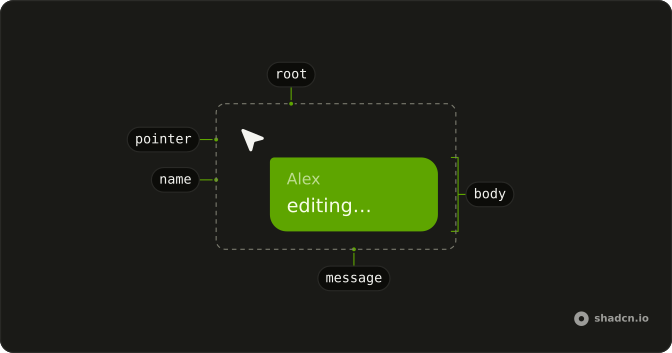
Cursor
├── CursorPointer
└── CursorBody
    ├── CursorName
    └── CursorMessage
Usage
import {
  Cursor, CursorBody, CursorMessage, CursorName, CursorPointer,
} from "@/components/ui/cursor";<Cursor color="var(--info)">
<CursorPointer />
<CursorBody>
<CursorName>Alex</CursorName>
<CursorMessage>editing…</CursorMessage>
</CursorBody>
</Cursor>Accessibility
A Cursor ignores the pointer (pointer-events: none), so it never covers what's under it, and its pointer is hidden from assistive tech. The name and the message are plain text, read where they sit in the page. When the people present are already listed elsewhere, such as an avatar row, add aria-hidden to each Cursor so they aren't read twice. Each name and message takes its own reading direction from its text, and in right-to-left text the cursor mirrors: the pointer tips the other way and the tag sits to its left.
Demos
Colours
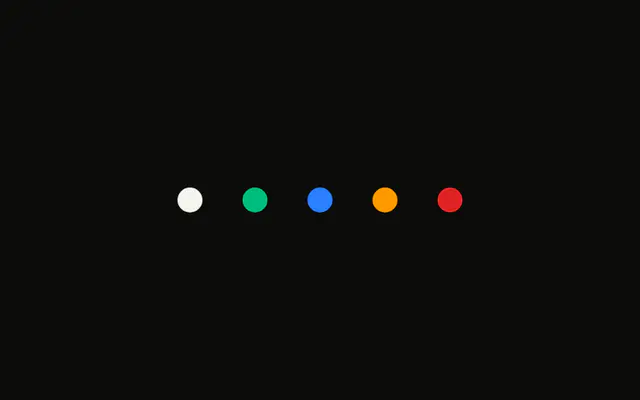
color takes any CSS colour for one person's pointer and tag, here the theme's info, success, warning and destructive. The tag's text turns dark on a light colour and light on a dark one by itself. Without color, a cursor takes primary.
Parts
A pointer alone, a pointer with a name, and a pointer with a name and a message. When CursorBody holds a message, the name steps back and the corner by the pointer tightens, so the message reads as what they're saying.
Canvas
Three people on one document: positioned with absolute and logical insets (start-[62%] top-[34%]), one beside the selection that matches their colour. In an app, set those from each person's coordinates as they arrive, in style, and the cursors move with no work of their own.
FAQ
Why doesn't Cursor follow my mouse?
It shows where other people are, so it's placed, not attached to your pointer. Position it from the coordinates your multiplayer backend sends for each person. Your own mouse already has the system cursor.
How do I build a Cursor in Solid?
Cursor wraps CursorPointer (the arrow) and CursorBody, which holds CursorName, CursorMessage or both. Leave CursorBody out for a pointer alone. The Parts demo shows all three shapes.
How do I give each person a different colour?
Pass color to Cursor: any CSS colour or theme variable, such as var(--info). It sets --cursor-color, which colours the pointer and the tag, and the tag's text picks dark or light to stay readable. That text uses CSS relative colours, in every current browser; set a text colour on CursorBody to choose your own.
How do I place a Cursor at given coordinates?
Make it absolute inside a relative frame and set left and top in style (or start-* and top-* classes). The pointer's tip is the cursor's top-start corner, so the coordinates are where the tip points. It takes no clicks, so it never blocks the page under it.
API Reference
Cursor
<span> data-slot="cursor"
color?string
The collaborator's colour, any CSS colour: the pointer and the body's fill. The body's text turns dark or light to stay readable on it.
- Default
"var(--primary)"
class?string
Merged with the part's classes.
--cursor-colorstring
The pointer's and the body's colour (var(--primary)).
CursorPointer
<svg> data-slot="cursor-pointer"
class?string
Merged with the part's classes.
--cursor-colorstring
The pointer's and the body's colour (var(--primary)).
CursorBody
<span> data-slot="cursor-body"
class?string
Merged with the part's classes.
--cursor-colorstring
The pointer's and the body's colour (var(--primary)).
CursorName
<span> data-slot="cursor-name"
class?string
Merged with the part's classes.
--cursor-colorstring
The pointer's and the body's colour (var(--primary)).
CursorMessage
<span> data-slot="cursor-message"
class?string
Merged with the part's classes.
--cursor-colorstring
The pointer's and the body's colour (var(--primary)).