shadcn.io is an independent project built on shadcn/ui
A row of icons on a shelf that grow as the pointer passes over them, the way the macOS dock does.
Use it for a handful of apps, tools or pages that people know by their icon, with the name shown on hover. For a labeled bar that marks the current section, use Menu Dock. In Solid, Ark UI moves only transforms, so the page around the dock never shifts.
Installation
Anatomy
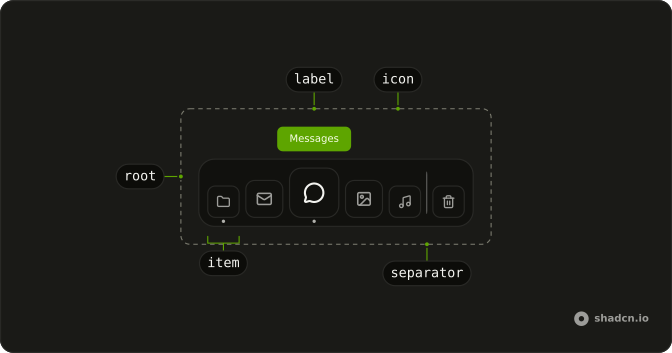
Dock
├── DockItem
│   ├── DockLabel
│   └── DockIcon
└── DockSeparator
Usage
import { HouseIcon, SettingsIcon } from "lucide-solid";
import {
  Dock, DockIcon, DockItem, DockLabel,
} from "@/components/ui/dock";<Dock>
<DockItem>
<DockLabel>Home</DockLabel>
<DockIcon>
<HouseIcon />
</DockIcon>
</DockItem>
<DockItem>
<DockLabel>Settings</DockLabel>
<DockIcon>
<SettingsIcon />
</DockIcon>
</DockItem>
</Dock>The icons grow upward out of the dock and the label floats above them, so leave room over it: about the difference between magnification and size, plus the label's height.
Demos
macOS
Eight apps and the Trash on a wallpaper, Finder and Safari open. Each DockItem has active for the dot under an open app and bounce, so a click makes the icon hop while it toggles the app open or closed; aria-pressed says the same to assistive tech. DockSeparator keeps the Trash apart, as macOS does. The tiles are DockIcon with its own className, one in the primary color.
Magnification
Two docks of the same six icons. The subtle one grows an icon to 52 pixels within 100 pixels of the pointer, the strong one to 96 within 220. size is an icon at rest, magnification its size under the pointer, and distance how far the growth reaches. A short reach keeps one icon big; a long one lifts several at once.
Links
A site's pages as a dock. Each DockItem renders as the link itself, the current page marked with active and aria-current, and a separator before the feed. Use links when an item navigates, and buttons for actions, never a link inside a button.
Avatars
A team as round photos. DockIcon holds an image and takes rounded-full, and the dot marks who is online. The label carries the name, because the photo has no words; keep the image's alt empty so the name isn't read twice.
FAQ
How do I change how much the Dock magnifies?
Three numbers on Dock, all in pixels. size is an icon at rest (48), magnification its size right under the pointer (80), and distance how far from the pointer an icon still grows (140). The growth falls off on a cosine curve, so the icon under the pointer is the biggest and its neighbours ease aside to make room. The Magnification demo puts a subtle and a strong setting side by side.
How do I show which apps are open in the Dock?
Set active on a DockItem to draw the dot under its icon, as macOS marks an open app. Add bounce and a click makes the icon hop once. The macOS demo toggles both from a list of open apps in state, and sets aria-pressed so the state is announced, not only drawn.
How do I make a Dock item a link in Solid?
Render DockItem as the link instead of putting a link inside it. The Links demo shows how for this target. The link keeps the item's styles, its label and its place in the arrow-key order. Mark the current page with aria-current as well as active, because the dot is only drawn.
Can I use the Dock from the keyboard?
Yes. The Dock is a toolbar with one tab stop: Tab lands on the item last focused, the arrow keys move along it (mirrored in right-to-left layouts), and Home and End jump to the ends. The focused icon grows and shows its label as a hovered one does. Enter presses the item, and so does Space when it's a button.
What does the Dock do with reduced motion?
With reduced motion nothing grows, spreads or bounces: the icons keep their size and the labels still appear on hover and focus. Touch never magnifies either, since there is no pointer to follow. The dock works the same way without the effect.
Why does the Dock overlap what's above it?
The icons grow upward with a transform, and transforms take no room in the layout, so the page never jumps while the pointer moves. Give the dock space above it, roughly magnification minus size plus the label's height, or place it at the bottom of the screen as macOS does.
How do I style the Dock with Ark UI?
The dock's surface is the root's ::before layer, which widens as the icons spread, so restyle it with before: classes on Dock (before:bg-muted, before:rounded-3xl). Tiles and images go on DockIcon's className, and the label is a plain span you can recolor. Edit the file under components/ui to change every dock at once.
API Reference
Dock
<div> data-slot="dock"
distance?number
How far from the pointer icons still grow, in pixels.
- Default
140
magnification?number
An icon's size right under the pointer, in pixels.
- Default
80
size?number
Each icon's size at rest, in pixels.
- Default
48
class?string
Merged with the part's classes.
--dock-scalestring
On each item: how much its icon is grown now.
--dock-shiftstring
On each item: how far it's moved aside now.
--dock-sizestring
Each icon's size at rest (from size).
DockItem
<button> data-slot="dock-item"
active?boolean
Shows the dot under the icon, as macOS marks an app that's open.
- Default
false
bounce?boolean
Whether the icon bounces when clicked, as an app does when it opens.
- Default
false
asChild?(props: ParentProps) => JSX.Element
Render your own element: a function that gets the part's props to spread on it.
- Type
(props: ParentProps) => JSX.Element
class?string
Merged with the part's classes.
data-active?string
Present when active is true.
--dock-scalestring
On each item: how much its icon is grown now.
--dock-shiftstring
On each item: how far it's moved aside now.
--dock-sizestring
Each icon's size at rest (from size).
DockIcon
<span> data-slot="dock-icon"
class?string
Merged with the part's classes.
--dock-scalestring
On each item: how much its icon is grown now.
--dock-shiftstring
On each item: how far it's moved aside now.
--dock-sizestring
Each icon's size at rest (from size).
DockLabel
<span> data-slot="dock-label"
class?string
Merged with the part's classes.
--dock-scalestring
On each item: how much its icon is grown now.
--dock-shiftstring
On each item: how far it's moved aside now.
--dock-sizestring
Each icon's size at rest (from size).
DockSeparator
<hr> data-slot="dock-separator"
class?string
Merged with the part's classes.
--dock-scalestring
On each item: how much its icon is grown now.
--dock-shiftstring
On each item: how far it's moved aside now.
--dock-sizestring
Each icon's size at rest (from size).