shadcn.io is an independent project built on shadcn/ui
A card that leans back when it's hovered, as if a pin had been dropped on it: a line of light rises from its middle to a label, and rings spread on the ground around it.
Use it to point at one thing on a page: a featured project, a place on a map, the stand people should find. Give it a href and the whole card is one link named by its label. For a card that follows the pointer, use a 3D Card; for a label on an ordinary element, a Tooltip. In Solid the tilt is a CSS transition and the rings a CSS animation, so nothing else is installed.
Installation
Anatomy
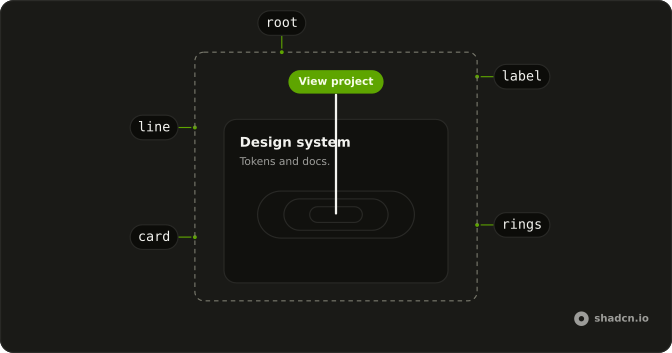
Pin3D
├── link (with href)
├── card
│   └── children
└── perspective (shown on hover)
    ├── label (the title)
    ├── rings
    └── line
Usage
import { Pin3D } from "@/components/ui/pin-3d";<Pin3D href="/projects/atlas" title="View project">
<div class="flex size-72 flex-col gap-1">
<h3 class="font-semibold">Atlas</h3>
<p class="text-muted-foreground text-sm">Maps for every team.</p>
</div>
</Pin3D>Accessibility
With href, a link covers the card and its name is title, so a screen reader hears "View project, link" once rather than every line of the card. Focus it with the keyboard and the card leans back and the pin shows, as on hover. The rings, the line and the label are decoration and hidden from assistive tech. With reduced motion the card stays upright and the rings hold still; the label and the line still show.
- Tab
- Move focus to the card's link, which shows the pin.
- Enter
- Follow the link.
Demos
Image
A photo with a caption under it, linked to its trail. The card's padding and border come from Pin3D, so the content is just what goes inside: here a 4:3 image and one line. The label reads View trail, the link's name for a screen reader too, so make it say where the link goes.
Without a link
No href: the card still leans back and shows its pin on hover, but it isn't a link and takes no focus. Use it as a marker on a floor plan or a map, where the pin says "here" and nothing opens. Content inside it, such as a button, stays clickable, since no link covers it.
Grid
Two smaller cards side by side, each with its own link and label. Only the hovered one leans back, since each card is its own hover group. Leave room above each card for its label, which sits over the card's top edge.
FAQ
How do I make a 3D Pin link somewhere?
Pass href. A link then covers the whole card, named by title, so clicking anywhere on it follows the link and Tab reaches it once. Give a title whenever you give an href, since it's the link's only name. The link opens in the same tab, like any link.
What if I don't want it to be a link?
Leave out href. The card still leans back and shows the pin and the label on hover, but it isn't focusable and nothing covers its content, so buttons or links inside it work as usual. The Without a link demo on this page shows it.
Where does the title appear?
In a small pill above the card, at the top of the pin's line, faded in on hover or keyboard focus. Keep it to two or three words, such as View project. It's also the link's accessible name when there's an href. With no title, there's no pill and the line rises to nothing.
How do the rings and the tilt work?
The card's lean is a CSS transition to rotateX(40deg) and 80% scale. The three rings run one CSS animation, 6 seconds long, two seconds apart, and play only while the card is hovered or its link has focus. They lie on a plane turned 70 degrees, which is why they look like ellipses.
What happens with reduced motion in Solid?
The card doesn't lean and the rings hold still at three sizes, so the reader still sees the label and the pin, without movement. Hover and focus work the same, and the link is the same link.
API Reference
Pin3D
<div> data-slot="pin-3d"
href?string
Where the card goes. With it, the whole card is one link, named by
title; without it, the card only shows the pin.
title?string
The label on the pin, shown above the card while it's hovered.
class?string
Merged with the part's classes.
--pin-3d-ring-stillstring